WHAT'S NEW?
Loading...
Showing posts with label android. Show all posts
How to save Google Maps for offline use
As we all know google maps are being very helpfull on all the aspect wheather we want to use it for navigation purpose or to find some restaurants or some dinning area near by they are being used everywhere now a days.But the main drawback is they require a large amount of mobile data WHAT IF WE ARE RUNNING SHORT OF MOBILE DATA? due to which nokia maps are here to save the offline maps but now Google maps also offers to save the map offline with a simple and easy steps you can do.
so we start as:
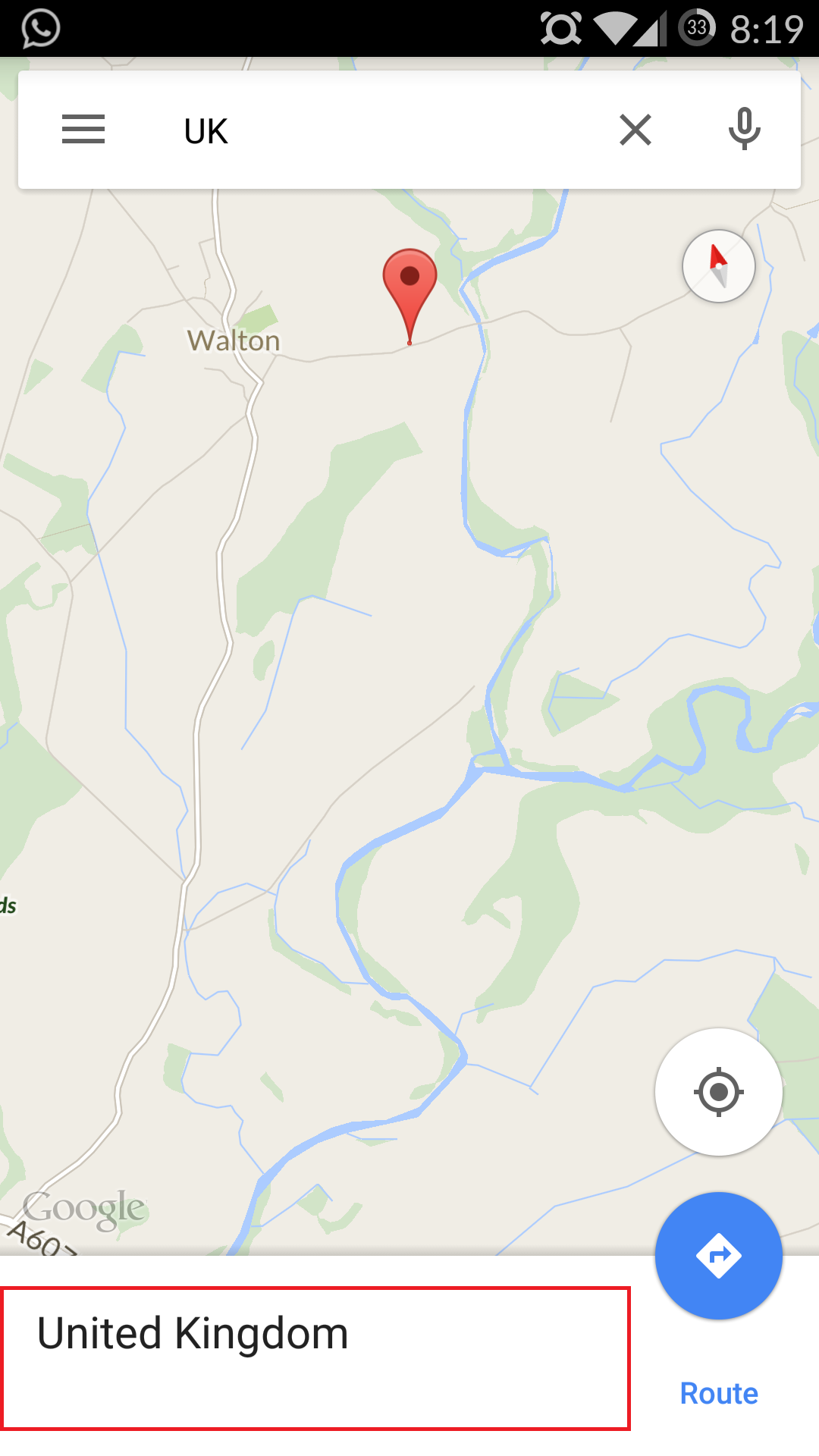
1. Click  on the search bar and then search for a place. Now you will see the place name at bottom.
2. Tap the bar at bottom, you will be seeing options like Route, Save, and Share.
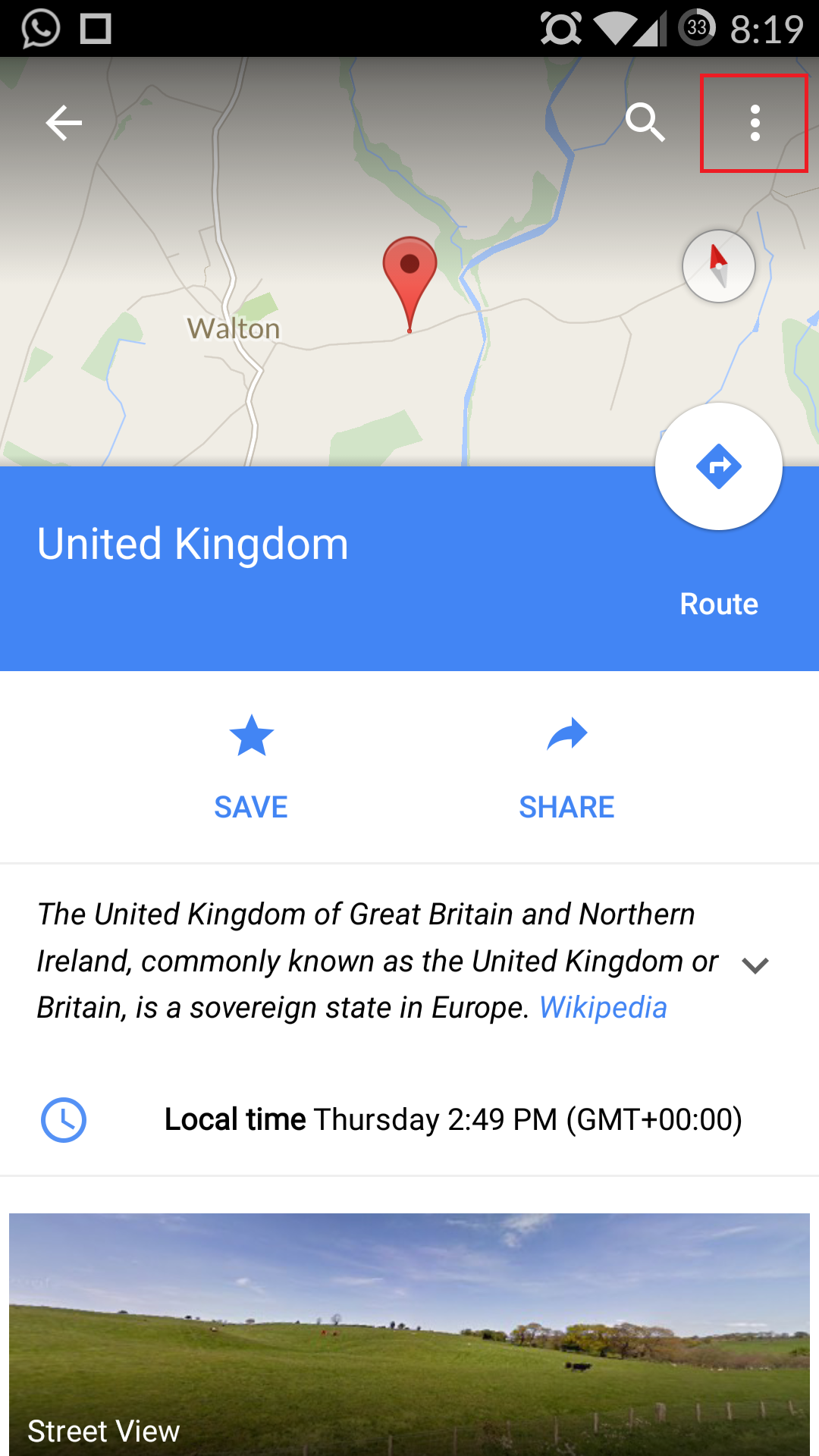
3. Click on the three dots coming on the top right side of your screen.
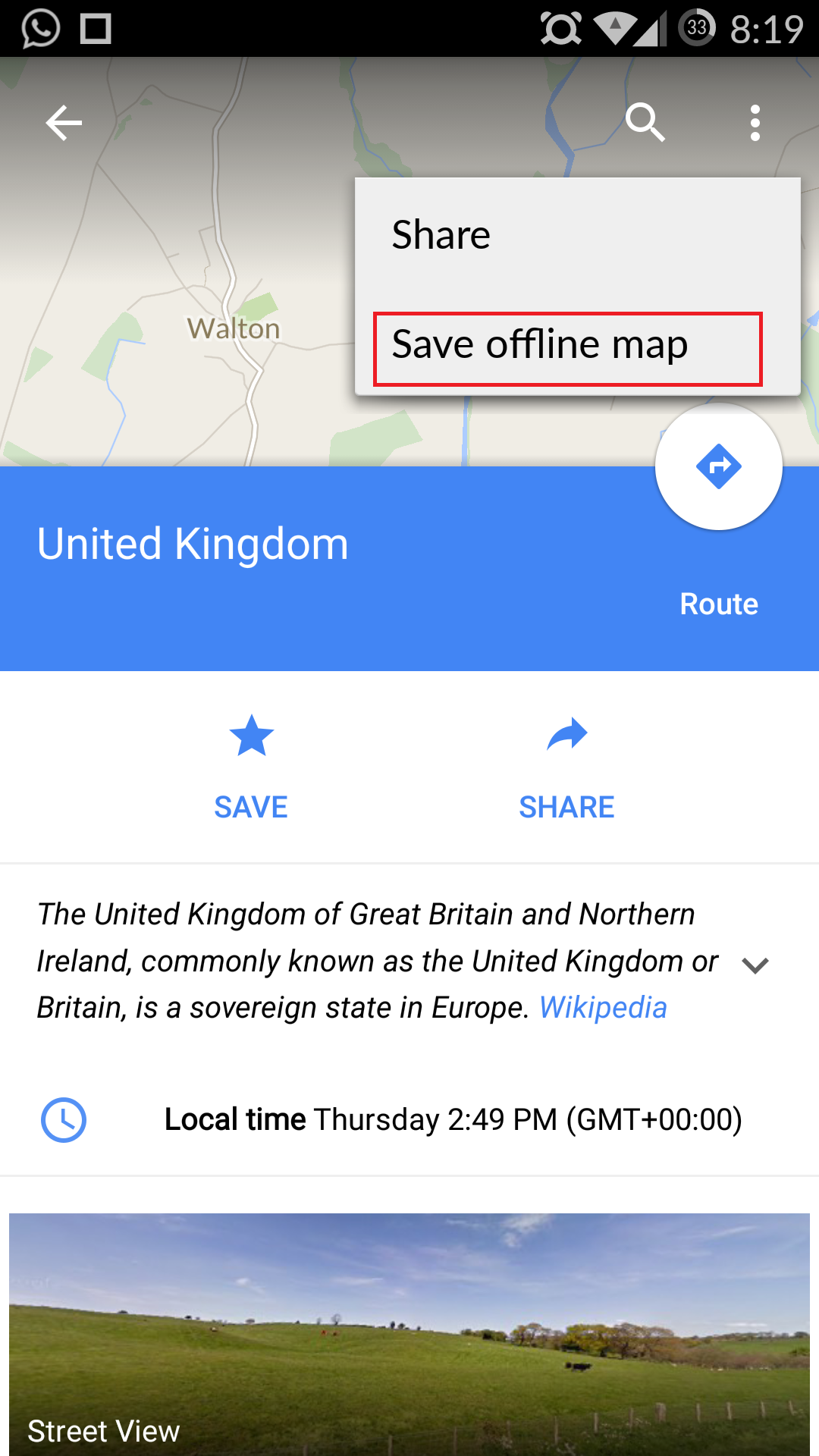
4. Now, you will be able to see the option for “Save Maps to use offline”.
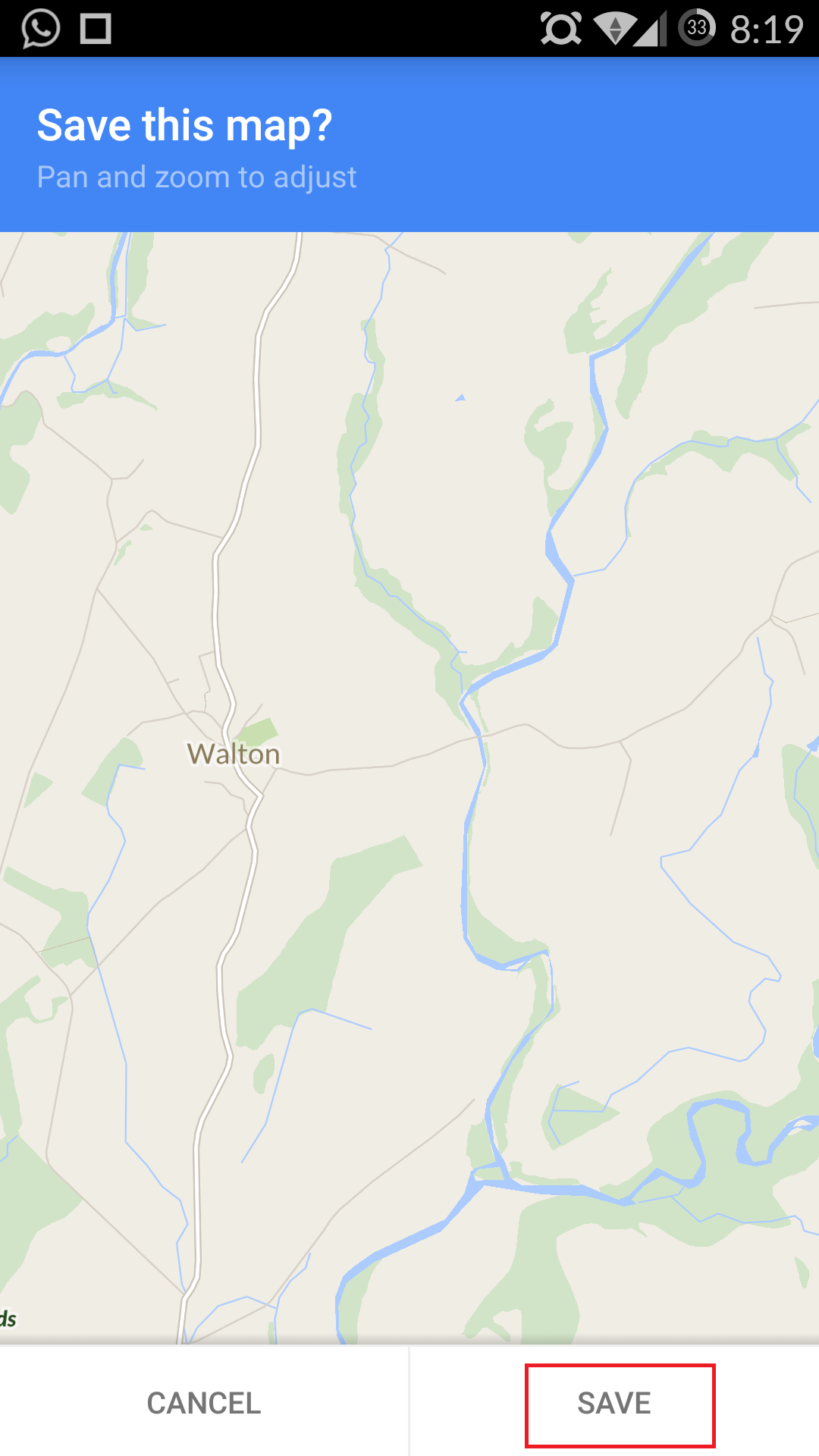
5. Click on it, and it will ask to confirm to save the map or not and just click on save button.
Saving Google Maps OfflineSaving Google Maps OfflineSaving Google Maps OfflineSaving Google Maps Offline

To access the saved maps,
1. open Google Maps, then sweep the menu bar from the bottom left.
2. Now tap onYour Place. If you are using your data connection, you need to scroll down to the bottom to find View all and manage, Otherwise without the data connection, it will be available at the top. Here you will find your saved maps.

  • Area must not be too large.
  • The saved areas in offline Google Maps are automatically cleared after 30 days.
  • Location services will be very slow due to no data connection while using offline Google Map.
  • Since you don’t have a data connection, you won’t be able to perform step-by-step navigation in offline Google Map.
  • If you prefer downloading the maps in bulk for offline navigation, I will suggest you to try Nokia Here maps Or whole Google map offline which is about 1.7GB


Guide to install OxygenOS on OnePlus One in Linux
This step-by-step guide shows you how to install OxygenOS on OnePlus One in Linux.
OnePlus gained immense popularity after its debut for mainly two reasons. First and foremost, it’s a beast when it comes to hardware and performance but has a very reasonable price tag. Second reason is that it comes officially with CyanogenMod. If you use OnePlus, you won’t be surprised that it has been named best Android smartphone of the year by many reputed blogs.
But things went sour between OnePlus and CyanogenMod when CyanogenMod decided to ditch OnePlus for Micromax. That was the deciding moment for OnePlus to work on it’s own OxygenOS. Good thing is that OxygenOS first stable version has been releasedcouple of weeks back and is available for OnePlus user to flash Cyanogen OS and install the new one instead.
Considering that you are a OnePlus user and want to try the new Android Lollipop based OS, I am going to detail each and every step so that you can easily install OxygenOS on your OnePlus device in Linux. But before we see that, let’s first see what are the prerequisites.

Prerequisites to flash OxygenOS on OnePlus

You’ll need the following:
  • A OnePlus device of course
  • A Linux based computer with good internet connection. OxygenOS itself is around 700 MB in size. Besides that, you need to install a few tools to carry out the procedure.
  • Data cable to connect OnePlus with the computer
I have performed the tutorial in Ubuntu 14.04 but I believe the steps remain the same for other Linux distributions as well, except for the installation method of Android development tools. But good thing with this method is that you do not need to root OnePlus.
Before you go on installing OxygenOS on OnePlus, I must warn you that you take a little bit of precaution. I believe you know what you are doing. Your data will be wiped out completely, so prepare a backup beforehand. I should not be held responsible for any mishap. You have been warned 

Install OxygenOS on OnePlus One in Linux

Step 1: Download OxygenOS

First thing first, download OxygenOS. The file is a little more than 700 MB, so please mind your internet connection. You can get the installation file from the link below:
The downloaded files will be compressed in zip format. Extract it.

Step 2: Install Android development tools

You’ll need adb and fastboot Android dev tools. Open a terminal and use the following commands to install it in Ubuntu and other Ubuntu based Linux distributions such as Linux Mint, elementary OS etc.
sudo apt-get install android-tools-adb
sudo apt-get install android-tools-fastboot

Step 3: Enable debugging mode in OnePlus

  • On your OnePlus, go to Settings->About Phone->Build Number. Tap on build number 7 times to enable the developer mode.
  • Go back one step i.e. on Settings menu, move down to bottom to see the Developer Options here. Go in it and enable the USB Debugging option. Also make sure touncheck the option of Update CM Recovery.
I took the screenshots butt forgot to copy it to my computer and hence I lost them. But you can follow a similar screenshot tutorial for enabling debug option.

Step 4: Unlock the bootloader

Now we need to unlock the bootloader.
  • Turn off the device and boot in to fastboot mode by holding the volume up and power button simultaneously for few seconds. You will see a screen like this:
    fastboot mode in OnePlus
  • Now connect your device to you computer via the data cable. Open a terminal and use the following command to unlockthebootloader:
    sudo fastboot oem unlock
It will reboot the device while taking some time. You’ll have to reconfigure the device as if it’s brand new.Of course, You’ll lose all the data as I had warned already. I would advise not to waste time in re-configuring the device because we will have to erase all the data again. So, no need to enter network password and configuring Google account etc.

Step 5: Repeat Step 3

Once you unclock the bootloader, enable developer option and uncheck Update CM Recovery option again.

Step 6: Flash TWRP recovery

Next we need to download and install a custom recovery. We’ll be using the TWRP for this purpose. Go to the link below and download the most recent version. OnePlus One is codenamed bacon, just for information.
The recovery files will be around 10 MB in size. Once you have downloaded the files, we need to flash it to the device:
  • Turn the device off and bootinfastboot mode again as you did step 4 by holding volume up and power button simultaneously. Once infastboot mode, connect the device to the computer again use the following command to install a custom recovery (I am considering that you have downloaded the files in Download directory):
    cd ~/Downloads
    
    sudo fastboot flash recovery twrp*
    Basically, you need to provide the path to the downloaded custom recovery image file.
  • Now use the command below to reboot the device:sudo fastboot reboot
You have the custom recovery installed. Now we come to the last step and which is to install OxygenOS on OnePlus.

Step 7: Install OxygenOS on OnePlus

  • After rebooting, boot into recovery mode by pressing volume down and power button at the same time.
  • In the recovery mode, click on Wipe to reset the device. The screen will look like this:
    Wipe data from OnePlus recoveryIn next screen, do factory reset swipe to do a factory reset.
  • After doing the factory reset, go back to the main recovery screen. At this stage, connect your device to computer again and copy the extracted folder of OxygenOS in to the Downloads folder of OnePlus.
  • Once you have the installation files on the  device, click on the install option on the main recovery menu. It will ask you to give the path to the installation files. I presume you can do that:
    Flash OxygenOS to OnePlus
  • Swipe to confirm flash:Flash OxygenOS in OnePlus One
  • You’ll see a screen with commands running. Don’t bother yourself with the red error lines. Just wait for the end result to see whether or not the process was successful:successful flash of OxygenOS on OnePlus One
Note: If you see an error like “no MD5 file found… error flashing zip”, it means you have not pointed out the correct flashable file. Make you extract the downloaded OxygenOS files to see a flashable zip and MD5 files in it. Copy this extracted directory to OnePlus.
It will take some time to flash OxygenOS to OnePlus. Once it is successful, reboot the system from the given options. Congratulations! You have successfully installed OxygenOS on OnePlus One.

Did it work for you?

If you follow all the steps as mentioned above, it should take around 10-15 minutes toinstall OxygenOS on OnePlus One (not considering the time in downloading the files). Give it a try and let me know if you face any issues. Also, feel free to share your experience with OxygenOS 

Microsoft wants your Android!
Windows 10 news now smartphans: Microsoft wants to bring its new operating system to your Android smartphone.
Wait, WHAT?!
Yeah, that's right, Microsoft wants to wrangle your unrestricted OS, throw up a bunch of electric fences and restrict the amount of apps you'll be able to download.

OK, maybe not quite like that, but the Softies have announced plans to allow users to trial a custom ROM on the Xiamoi Mi 4 that removes all trace of the Android OS for an almost complete version of Windows 10.
It's Microsoft's attempt to steal users from the Android ecosystem and switch them over to Windows Phone, but it'll be some seriously hard work considering the reduced number of apps available on the platform.
Will anyone actually choose to make their Android run Windows Phone? Only time will tell.
Or, well, no.


Update: More evidence has emerged to suggest that Android Wear and iOS are not as incompatible as you might think.
A developer who goes by MohammadAG has created a workaround that lets Android Wear users receive notifications and answer calls from their iOS devices on their smartwatches, according to Android Authority.
Even more interesting, though, is what the developer later tweeted: that Android Wear version 4.4 contains "iOS related code," which in his mind "confirms they're working on it."
This is still no indication that either Apple or Google has any interest in playing nice with one another in the wearables space, but the mounting evidence is something to keep in mind nonetheless.
Original story below…
If you wanted to take some of the wind out of the Apple Watch launch, what would you do? Why, make your own smartwatch platform compatible with iPhones, that's what.
French tech website 01net reckons that's exactly what Google is plotting. The site isn't well-known outside of France, but it has hit the mark with a couple of rumours in the past. Insiders seem to think an announcement could be made at Google I/O in May.
It's not the first time the possibility has been aired, either. Last year, Android Wear Product Manager Jeff Chang dropped a few hints that he'd like to see the software made available to as many people as possible - and that includes those running iOS on their smartphones.

Over to you, Apple

As Chang pointed out at the time though, it's not just down to Google: Apple would have to approve the app and has full control over the APIs and other protocols that paired devices can access. Would Tim Cook be willing to let Android Wear work with iOS?
The new Microsoft Band works with iOS, as does the Pebble range, so it's not completely out of the question that Android Wear could join them. Google already has plenty of iOS apps in its collection as well.
For now, it's nothing more than an unsubstantiated rumour, but it's an interesting prospect in the run up to the Apple Watch launch. We can be certain that Apple's timepiece will never support Android, but there seems more than a chance that the opposite could happen.

Microsoft dropped an interesting piece of information today amid its confirmation that Windows 10 will go on sale this summer.
Near the end of its announcement, the Redmond-based company casually revealed that it is testing Windows 10 with “power users” of Xiaomi’s flagship Mi 4 Android smartphone. The initiative, which Xiaomi stressed is not a partnership but merely assistance with the trial, is an interesting one because it again shows Microsoft’s new ‘platform agnostic’ approach.
Neither Microsoft nor Xiaomi provided specific details of the Windows 10 software being trialled, but TechCrunch understands from sources that it effectively overrides Android, turning the Xiaomi phone into a Windows 10 device complete with Microsoft services. (Which the company hopes will dazzle Android owners into making the switch.)
That’s to say that the software doesn’t offer a dual boot option, which Microsoft has pushed in the past in India. This is a ROM, based on Windows, that operates much like software from Cyanogen — a company Microsoft was incorrectly linked with an investment in— and other custom ROMs developed by the likes of Tencent and Baidu in China.
The ROM is thus designed to go beyond Microsoft’s Android apps and offer a native-like Windows experience on Android phones.
That’s a pretty powerful concept, and it is no surprise to see Microsoft testing it in China, where consumers are more inclined to install ROMs. There’s a greater spirit of customization in China, particularly for Android users since third-party app stores are the norm as Google Play is severely restricted there.
Microsoft, of course, has big plans to make this software available on more devices in time.The company told The Next Web that full availability will be announced soon (update: full statement below), but it is starting out with Xiaomi — almost certainly because it has a strong community of users who provide feedback on the company’s weekly software updates. Xiaomi’s receptive audience is ideal for such a pilot.
A good idea though it may be, getting adoption for an Android ROM in China is no easy thing. Just ask Baidu, which recently shuttered its Android software efforts due to low interest — that’s despite the company’s vast reach and distribution potential as ‘China’s Google’.
As for Xiaomi, people are often quick to rush to the idea that it is at odds with Google since it doesn’t offer the U.S. company’s services on in MIUI platform in China. Xiaomi’s emphatic comment that its involvement in Windows 10 is not a partnership — coupled with Hugo Barra recent explanation that it is not pushing its suite of services to users outside of China — suggests that this is not tactical; Xiaomi is just giving it users another ROM to tinker with.
The news could be taken in a cynical way in the U.S. — where what’s good for the users is often convenient because it’s good for the business too — but Xiaomi really has cultivated a sizable and trusted community, so we’re inclined to believe its rhetoric on this occasion.
Update: Here are more details from Microsoft:
As part of the Windows Insider Program, Microsoft will partner with Xiaomi to offer Windows 10 free downloads to a select group of Xiaomi Mi4 users. Xiaomi Mi4 users will get the ability to flash their phones with the new Windows 10 OS and provide feedback to Xiaomi and Microsoft on their experience. This partnership will allow Xiaomi and Microsoft to get direct user feedback and continue to improve the experience for China. Microsoft is thrilled to see Xiaomi embracing Windows 10 and offering this great value to their customers. We’re excited to see the feedback we receive from this audience.
Xiaomi is a leading phone manufacturer in China undergoing significant global expansion. We are excited to partner with them in China and jointly gather feedback from Chinese users on their experience with Windows 10 to jointly collaborate on product and services development for the platform.
Availability will be announced in the months to come.

OnePlus One fans rejoice, the startup Chinese firm has finally confirmed its Android Lollipop update release date.
Talking on its own forum, OnePlus staffer Bradon H explained the rollout plans for Android 5.0 while also apologising for the delay. He also highlighted that users will get the choice of two different upgrades.
First up is the straightforward over-the-air (OTA) update bumping the handset to the Lollipop variant of CM 12S (Cyanogen Mod), which "will be released on or before March 30."

Something different

If you fancy changing things up you can opt for OnePlus' own Android ROM, dubbed OxygenOS, which will be available for download on or before March 27.
There's no OTA option for OxygenOS - users will have to download and flash the operating system themselves, which is a bit more of a hassle.
The One is the only handset currently offered by the firm, but we fully expect the OnePlus Two to arrive sometime this year, although a release date for this is still very much up in the air.
Until then, you'll have to make do enjoying Lollipop on the still-very-good One.

Google Play, Google’s marketplace for Android applications which now reaches a billion people in over 190 countries, has historically differentiated itself from rival Apple by allowing developers to immediately publish their mobile applications without a lengthy review process. However, Google has today disclosed that, beginning a couple of months ago, it began having an internal team of reviewers analyze apps for policy violations prior to publication. And going forward, human reviewers will continue to go hands-on with apps before they go live on Google Play.
Additionally, Google announced the rollout of a new age-based ratings system for games and apps on Google Play, which will utilize the scales provided by a given region’s official ratings authority, like the Entertainment Software Rating Board (ESRB) here in the U.S.
According to Purnima Kochikar, Director of Business Development for Google Play, Google has been working to implement the new app review system for over half a year. The idea, she says, was to figure out a way to catch policy offenders earlier in the process, without adding friction and delays to the app publishing process. To that end, Google has been successful, it seems – the new system actually went live a couple of months ago, and there have been no complaints. Today, Android apps are approved in hours, not days, despite the addition of human reviewers.
“We started reviewing all apps and games before they’re published – it’s rolled out 100%,” says Kochikcar. “And developers haven’t noticed the change.”
Google Play New Content Ratings Image
The reason why Google’s app review team is able to process app submissions so quickly is because the system also includes an automated element. Before app reviewers are presented with the applications, Google uses software to pre-analyze the app for things like viruses and malware as well as other content violations. For example, its image analysis systems are capable of automatically detecting apps that include sexual content, as well as those that infringe on other applications’ copyright.
Google didn’t want to get into the specifics of what it’s capable of in terms of automation, but notes that it can identify a number of violations beyond just the inclusion of malware.
“We’re constantly trying to figure out how machines can learn more,” explains Kochikar. “So whatever the machines can catch today, the machines do. And whatever we need humans to weigh in on, humans do.”
Though Google uses more machine-aided processes in reviewing applications than Apple does currently, Kochikar admits that with regard to its human element, Google’s system may not be “as robust” as those from “rivals.” That is, Google is trying to balance being able to catch the violations earlier without impacting the time it takes to get an app published to its Android app marketplace.
The new system also means that developers will now be able to see their app’s publication status in more detail, and learn quickly if and why an app has been rejected or suspended, says Google. In the Developer Console, app creators will see their app’s latest publishing status, allowing them to easily fix problems and resubmit apps after correcting minor violations.

New Age-Based Ratings

In addition, Google also announced another far-reaching change which will affect all Google Play developers worldwide: the addition of an age-based ratings system for apps and games. Starting in May, developers will have to complete a content questionnaire about their app ahead of submission, which has been designed to help identify objectionable content and return the most appropriate rating.
IARC ratings@2x
Because rating systems vary by region, Google has worked on this implementation with the help of the International Age Rating Coalition (IARC) and its participating bodies, including the Entertainment Software Rating Board (ESRB), Pan-European Game Information (PEGI), Australian Classification Board, Unterhaltungssoftware Selbstkontrolle (USK) and Classificação Indicativa (ClassInd). Those regions that don’t have a specific ratings authority in place will include a more generic rating, notes Google.
That means that, in the U.S., Google Play games will feature the same ratings as you’d otherwise find on boxed software, like “Everyone (E),” “Teen (T),” “Mature (M),” etc. Other countries’ ratings will reflect those used by their own local organizations or regulatory bodies. And Google Play’s parental controls feature will be updated to allow blocking of these new rating categories.
Before today, app ratings on Google were somewhat problematic because developers were able to assign them by themselves. With the new age-based ratings, however, developers can’t override the rating without going back and taking the questionnaire again and editing their answers. Plus, Google says that it will review the ratings being produced by the new process, too, to make sure developers aren’t trying to lie on the questionnaire in order to adjust their app or game’s rating.
Initially, there will be a grace period while the new system is rolled out, but by the end of next month, it will become a blocking requirement for new app submissions and updates. Those apps that remain “unrated” may then be blocked in certain territories or for specific users, notes Google.

Our meeting with Line, a growing mobile instant messaging application very popular in Asia, was arranged in a nondescript room in Barcelona, a couple of weeks ago at MWC, but the company I was meeting was anything but unambitious.
Line is a subsidiary of South Korean internet behemoth, Naver, but its importance is such that it managed to become the company's main revenue source within just a few years.
Despite having "only" 181 million monthly active users (MAU), the company's Head of Business for the EU remains adamant that the firm will be able to catch up to its bigger rivals, Chinese WeChat (488m MAU) and US-based WhatsApp(around 700m MAU).
Sunny YoungEun Kim told us that Line has used Spain as the test bed for its onslaught on the European market. Spain has the lion's share of the 30 million active users in Europe with about 18 million MAU, and the service has yet to make any significant gains in the two biggest European markets, UK and Germany.
"They're still fresh for picking," Kim quipped.
What it does offer though is an intriguing insight into how instant messaging services might evolve as the race to diversify revenue sources becomes more frantic.

Money spinner

A little known fact about Line is that it is the world's biggest revenue generator on Apple's iOS and Google's Android platforms outside of games.
It generated a staggering 611 million Euros (about £436 million, $645 million, AU$843 million) in revenue in its last financial year. And that has been achieved without any advertising.
In comparison, WhatsApp brought in a paltry $16 million (about £11 million, AU$21 million, 15 million Euros) in the first half of last year, which normalised for a whole year is about one-twentieth of what Line has achieved.
The difference on an ARPU (Average Revenue Per User) basis is even more jaw-dropping. Each Line user brought in on average $3.56 per year, compared to $0.02 for Facebook's big acquisition.
No wonder that Naver is said to be preparing for an IPO for Line after having grown its international user base. The South Korean company has managed to crack the revenue problem which allows it to then focus on organically growing its user base.

Games and stickers

Line derives just over half of its revenue from labelled Line games (such as Line Raiders) with nearly a third coming from – wait for it – stickers, and the rest from its B2B activities.
The company has more than 100 different games that are connected to Line, with a Line app marketplace hosting the lot as well as a number of other consumer-focused efforts such as Line Pay or Line Taxi, an Asian rival to Uber.
Stickers are a surprising addition to anyone's bottom line, let alone an online one. The company has managed to carve itself a sizeable niche allowing its users to create stickers easily as well as buying and selling them.

B2B aspects

Line's B2B business is mostly centred on the creation of "official" accounts. Manchester United and Chelsea for example have their own official Line accounts but other businesses have to fork out fees for their official ones with the added benefit of a B2B API.
The main focus, Kim told me, was on the SMB market and small business owners.
With such a well-established revenue model, it's not surprising that Kim appears uncannily cool about the competition. Yes, WhatsApp is bigger and more established, but "they have a subscription model" she added, one that users need to pay for after using it for a year.
Line, she says, will never introduce a subscription; nor will it use advertising, content marketing or native content to prop up its bottom line.
Still, breaking the user base conundrum outside Korea and Japan appears to be the company's biggest challenge yet. "We had the first user advantage in the Asian market, which gave us a concrete identity," Kim conceded.

What will happen down the Line?

Matters are slightly different in Europe where things are more localised. What does the future entail for Line?
They are already testing a free call service that allows video calls as well, not unlike Skype. Like the latter you will be able to pay a premium to call fixed lines. It's already being tested in Spain and is available in Asia.
Line Connect is also another potential growth avenue for the company as it tries to establish a service that allows customers to get in touch with businesses via their official Line accounts.
Surprisingly, Kim also revealed that Line Chat will come to the PC as an old-style application rather than stuck in the browser as a plug-in.
"That's part of a bigger plan," she said, one aimed at providing "a lot of services" including entertainment, radio and media. It's not about technical innovation, she added, but more about delivering a better user experience.
What about specific plans for the UK? With two of the country's biggest football teams already on board, Kim said that the company had ambitious targets which would not only involve developers but also local designers.

Google's Play Store has been a ragtag crew of apps in terms of submission and posting criteria, and the subsequent ratings and quality of applications. This fact will be no more, it seems, as the company just announced it will be introducing an age-rating system, manual app review, and other undertakings aimed to increase the quality of apps in the Play Store.

Developers will still be able to get submission requests approved or rejected "in a matter of hours," but the apps will be scrutinized much earlier in the process for eventual policy and standards violations. As for the ratings system, it will be automatic, but devs will be able to fill a questionnaire for a more targeted approach to determining whether their app is suitable for kids or for adults. These are the rating systems that Google will follow:

Google Play’s new rating system includes official ratings from the International Age Rating Coalition (IARC) and its participating bodies, including the Entertainment Software Rating Board (ESRB), Pan-European Game Information (PEGI), Australian Classification Board, Unterhaltungssoftware Selbstkontrolle (USK) and Classificação Indicativa (ClassInd). Territories not covered by a specific ratings authority will display an age-based, generic rating. The process is quick, automated and free to developers.

We're all patiently awaiting the arrival of the Samsung Galaxy S6 but the latest rumour to emerge from the South Korean firm says the Snapdragon 810 processor is about to miss out on most of the action.
The reason? Overheating. Samsung reckons Qualcomm's powerhouse SoC isn't yet stable enough - and we have heard whispers that production issues are causing delays in its roll-out. So far Qualcomm's only comment to us has been a "no comment" but we'll update this article if it has more to say.
While Qualcomm gets its house in order, Samsung will reportedly use its own 14nm Exynos chip for 80-90 percent of the initial S6 production run, according to insiders. The Snapdragon 810 will be used for the remaining 10 percent and gradually take over from the Exynos.

The year of the Snapdragon

The Snapdragon 810 is set to take the smartphone world by storm in 2015 - assuming Qualcomm is able to iron out its issues. The next-generation performance it boasts will mean better 4K support, surround sound, improved gaming speeds and better audio, video and photo capturing.
The LG G Flex 2 is rocking a Snapdragon 810 chip and has yet to go up in flames so let's hope Qualcomm can resolve any potential problems soon. The LG G4 is another flagship we're expecting to see the chip in.
As for the Samsung Galaxy S6, there's a very good chance that we'll get our first look at it at MWC 2015 at the start of March. The word on the Las Vegas street suggests that it was shown off at CES - but only to a select number of partners.

A new rumour about the upcoming LG G4 claims that it will come with a 5.6-inch screen, placing it firmly in the phablet category.
The new leak comes from the @OnLeaks twitter account, which is generally well regarded for its tips on smartphones that have yet to be released.
Although the LG G4 could see a big increase in screen real estate compared to the LG G3, another rumour suggests that LG will release an even bigger handset, possibly called the LG G4 Note, later this year with a 5.8-inch display and its own stylus.

All three of the big phone operating systems now have voice command of some kind. Apple has Siri, Google has its impersonal and nameless search box and Microsoft has the perky Cortana.
But it seems that Microsoft has aspirations of spreading its assistant's wings far and wide, and will soon launch a version of Cortana on Android and iPhone.
In many ways Microsoft has really created a decent personal assistant with Cortana. Jovial when needed and helpful when required, Cortana takes a handful of best bits from Siri with some of the cleverness of Google and its location aware services. Cortana, for example, can remind you of things to ask when a specific contact is called. It also allows geo-fencing, which lets you set specific reminders when you get somewhere.
The project name at Microsoft is "Einstein" although it's not entirely clear if that's the name of the project to put Cortana on other devices, or if the name Cortana will remain exclusive to Microsoft products. The search assistant, who takes her name from a character in Halo, will be coming to Windows 10 when it launches later this year.

More than just voice search

According to Reuters, Microsoft has ambitions for Cortana that stretch way beyond what Google and Apple currently offer. It seems the firm sees this project of being much more like artificial intelligence, offering you context-sensitive information when you need it, and helping you be more efficient.
The big problem with moving Cortana to other devices, of course, is that it needs to be integrated quite tightly with the rest of the OS to work at its best. That will likely be the biggest challenge here for Microsoft.

Ever since the Google Nexus 5's availability began wavering late last year, we've been expecting to see it dropped entirely, and now that day has finally come.
Just like Google promised, the former flagship remained on sale for most of 2015's first quarter, but now it's MIA in Google's Play store and Google's brand new non-Play store.
"The Nexus 5 is no longer available for purchase," the phone's page now reads.
And it's not the only Google product that's disappeared; the first Chromebook Pixel, a high-end Chrome OS laptop, is also gone, as Ubergizmo points out.
It seems Google was in the mood for some spring cleaning this week, which could have something to do with the introduction today of a new Chromebook Pixel with a USB Type-C connector.
And there's always the Nexus 6, a bigger and better Google flagship that will surely remain on top - until the next thing comes along, at least.

Last week came and went with no hint of Android 5.1 for Nexus devices, despite what Android Police founder Artem Russakovskii said.
Now Russakovskii has updated his forecast to predict that the Lollipop update will arrive this week instead, saying it's "so close, [he] can almost smell it."
He cites multiple tenuous clues, including update pages on T-Mobile's and Google's websites, and speculates that Google might have adjusted the timing thanks to Apple's Watch event today.
What seems more likely is that there was some issue with Android 5.1 that required it to be delayed - or that it was never coming out last week to begin with.
Either way, Nexus users should keep an eye out as this week continues.
Original story below…
Android 5.1 is a much-anticipated update to Android 5.0 Lollipop, and according to one source it could arrive as soon as Friday.
The incremental Android update is expected to fix some of Lollipop's biggest problems, including bugs related to settings and UI, plus general performance improvements.
Last year we heard that 5.1 might arrive in February, but with the month come and gone and most Android phones still on 5.0 or below we're expecting to see it in March.
That's now backed up by Artem Russakovskii, the founder of Android news site Android Police, who posted on Google+ that a "solid" source says the update will arrive on Google Nexus phones this week.
Well, the week is almost over, so we'll know soon whether that source was correct.