WHAT'S NEW?
Loading...
Showing posts with label ios. Show all posts
FRAMINGHAM, Mass. February 24, 2015 – Android and iOS inched closer to total domination of the worldwide smartphone market in both the fourth quarter (4Q14) and the calendar year 2014 (CY14). According to data from the International Data Corporation (IDC) Worldwide Quarterly Mobile Phone Tracker, Android and iOS accounted for 96.3% of all smartphone shipments, up slightly from 95.6% in 4Q13 and from 93.8% in CY13. In terms of year-over-year shipment growth, Android outpaced the overall smartphone market for CY14 (32.0% vs 27.7%, respectively) while iOS beat the market in 4Q14 (46.1% vs 29.2%, respectively).

"Many of the same drivers were in play for Android and iOS to tighten their grip on the market," said Ramon Llamas, Research Manager with IDC's Mobile Phone team. "A combination of strong end-user demand, refreshed product portfolios, and the availability of low-cost devices – particularly for Android – drove volumes higher.

"What will bear close observation is how the two operating systems fare in 2015 and beyond," added Llamas. "Now that Apple has entered the phablet market, there are few new opportunities for the company to address. Meanwhile, Samsung experienced flat growth in 2014, forcing Android to rely more heavily on smaller vendors to drive volumes higher."

"Instead of a battle for the third ecosystem after Android and iOS, 2014 instead yielded skirmishes, with Windows Phone edging out BlackBerry, Firefox, Sailfish and the rest, but without any of these platforms making the kind of gains needed to challenge the top two," said Melissa Chau, Senior Research Manager with IDC's Worldwide Quarterly Mobile Phone Tracker.

"This isn't to say that vendors aren't making moves, especially for the growth segments – the low-end markets," continued Chau. "With Microsoft bringing ever-cheaper Lumia into play and Tizen finally getting launched to India early this year, there is still a hunger to chip away at Android's dominance."

Smartphone OS Highlights

Android pushed past the one billion unit mark in 2014, a significant milestone by itself but also because total Android volumes in 2014 bested total smartphone volumes in 2013. Samsung retained the leadership position by a wide margin, shipping more volume than the next five vendors combined. At the same time, Samsung's total volumes for the year remained essentially flat while Asian vendors including Huawei, Lenovo (including Motorola), LG Electronics, Xiaomi, and ZTE fueled the most growth for Google's platform.

iOS saw its market share for 2014 decline slightly even as volumes reached a new record and grew at nearly the same pace as the overall smartphone market. Much of this was due to the strong demand for Apple's new and larger iPhones and the reception they had within key markets. What remains to be seen is how Apple will sustain demand going forward, as larger screens were among the last gaps in its product portfolio.

Windows Phone had the smallest year-over-year increase among the leading operating systems growing just 4.2%, well below the overall market. Having finalized its acquisition of Nokia in the spring of 2014, Microsoft relied primarily on a long list of entry-level Lumia devices to maintain its position in the market, and relied on its partners HTC and Samsung to provide cover on the high-end of the market. With the launch of Windows 10 later this year, Windows Phone stands to make a more concerted effort to return to the high end of the market.

BlackBerry posted the only year-over-year decline among the leading operating systems, falling -69.8% from 2013 levels. 2014 marked a year of rationalization for the beleaguered platform, and by the end of the year the company had revealed multiple enhancements to its platform and new device additions with the BlackBerry Passport and BlackBerry Classic. CEO John Chen anticipates 10 million units will be shipped in 2015, returning the company to profitability and marking a 72% increase over the 5.8 million units shipped in 2014.


Top Four Smartphone Operating Systems, Unit Shipments, Market Share, and Year-Over-Year Growth, Calendar Year 2014 Data (Units in Millions) 
Operating System
2014 Unit Volumes
2014 Market Share
2013 Unit Volumes
2013 Market Share
Year-Over-Year Change
Android
1,059.3
81.5%
802.2
78.7%
32.0%
iOS
192.7
14.8%
153.4
15.1%
25.6%
Windows Phone
34.9
2.7%
33.5
3.3%
4.2%
BlackBerry
5.8
0.4%
19.2
1.9%
-69.8%
Others
7.7
0.6%
2.3
0.2%
234.8%
Total
1,300.4
100.0%
1,018.7
100.0%
27.7%


Source: IDC Worldwide Quarterly Mobile Phone Tracker, February 24, 2015
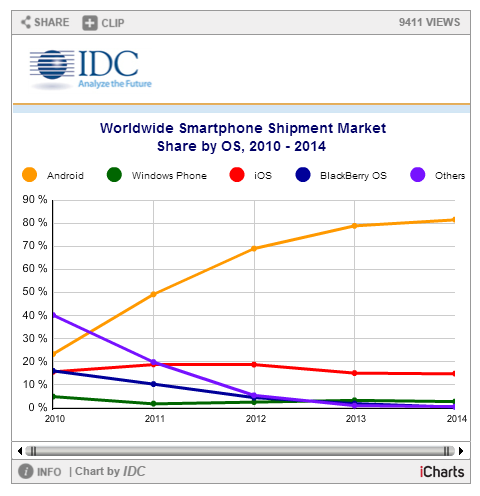


This chart is intended for public use in online news articles and social media. Instructions on how to embed this graphic are available by clicking here.


Top Four Smartphone Operating Systems, Unit Shipments, Market Share and Year-Over-Year Growth, Q4 2014 (Units in Millions) 
Operating System
4Q14 Unit Volumes
4Q14 Market Share
4Q13 Unit Volumes
4Q13 Market Share
Year-Over-Year Change
Android
289.1
76.6%
228.4
78.2%
26.6%
iOS
74.5
19.7%
51
17.5%
46.1%
Windows Phone
10.7
2.8%
8.8
3.0%
21.6%
BlackBerry
1.4
0.4%
1.7
0.6%
-17.6%
Others
1.8
0.5%
2.3
0.8%
-21.7%
Total
377.5
100.0%
292.2
100.0%
29.2%


Source: IDC Worldwide Quarterly Mobile Phone Tracker, February 24, 2015
Note:
  • Vendor shipments are branded shipments and exclude ODM sales for all vendors. The vendor names reflected in this release represent the current parent company (or holding company) for all brands, regardless of the date of mergers or acquisitions.
About IDC Trackers
IDC Tracker products provide accurate and timely market size, vendor share, and forecasts for hundreds of technology markets from more than 100 countries around the globe. Using proprietary tools and research processes, IDC's Trackers are updated on a semiannual, quarterly, and monthly basis. Tracker results are delivered to clients in user-friendly excel deliverables and on-line query tools. The IDC Tracker Charts app allows users to view data charts from the most recent IDC Tracker products on their iPhone and iPad.
For more information about IDC's Worldwide Quarterly Mobile Phone Tracker, please contact Kathy Nagamine at 650-350-6423 or knagamine@idc.com.
About IDC
International Data Corporation (IDC) is the premier global provider of market intelligence, advisory services, and events for the information technology, telecommunications, and consumer technology markets. With more than 1,100 analysts worldwide, IDC offers global, regional, and local expertise on technology and industry opportunities and trends in over 110 countries. IDC's analysis and insight helps IT professionals, business executives, and the investment community to make fact-based technology decisions and to achieve their key business objectives. Founded in 1964, IDC is a subsidiary of IDG, the world's leading technology media, research, and events company. To learn more about IDC, please visit www.idc.com. Follow IDC on Twitter at @IDC.
Are you looking forward for developing your own mobile application for iPhone, Android, Windows Phone or BlackBerry platform? If yes, you should check-out top 15 mobile app development tools that are mentioned in this blog. 

With the advent of smart-phones, the demand for innovative yet robust quality mobile application has been increased as everyone is looking to get their desired application that has rich features and functionalities. However, there are lots of people, who are trying their hands on developing their own mobile application.
Apart from this, various small-business owners have also decided to make their own mobile application as several ways are there to do it. But before you jump in the mobile application development pool, you should check out some of the best and advanced mobile application development tools that are listed below.

Let’s Give Quick Look on the Tools to Make Your Mobile App Development Task Easy:

Today, AppMakr is a high-end tool that allows newbies and developers to develop their own iPhone and android applications. It is one of the easiest ways to make a mobile app for your small business, community group or blog with the help of drag-and-drop mobile app maker.
appmakr
In other words, this high-end tool is a do-it-yourself application creation platform, enabling anyone to make their own iPhone apps, Android apps and HTML5 mobile formatted websites —with no coding required. Moreover, users of this tool can use existing content and social networking feeds in order to produce a lot of approaches for their app.
It comes with a range of features, including location-aware GeoRSS, push notifications, custom CSS and JavaScript capabilities. Perfectly works on the iOS, Android and Windows systems, AppMakr is obtainable for free of cost.
Appsbar is a feature-rich mobile application builder that is obtainable for free of cost for all the app builders and application lovers. You can join now and start developing your own free mobile application as application has been the must-have tech accessory for a lot of people.
appsbar
However, it is also true that not all the people have expertise in developing highly functional apps, but using this tool, people can make a high mobile application for any operating systems like iOS, Android, BlackBerry, Windows Phone and more.
The best thing about this tool is that it comes with a lot of features like user-friendly, free to use, tech support, video tutorials and more.
Configure.IT is a complete mobile app development platform with lots of premium features. App developers ranging from beginners to experts can readily develop an app without writing a single line of code. It is the easiest and simplest tool that provides browser-based, drag-and-drop app development facility, which means that no need to download any software toolkit. With the help of Configure.IT, it is possible to create an iOS app on Windows or Linux platform. It has removed the necessity of Macintosh to develop iOS apps.
off-banner
It has also removed compilation while previewing an app. Enjoy real-time preview by only screen splash. It provides MySQL database to build enterprise level and database oriented apps. There are 200+ customization properties available for native control. Don’t worry about scalability and performance because it is hundred percent cloud based platform.
The rest is to publish an app on an app store! Configure.IT creates an app in accordance with app store guidelines that match market standards. That means you can get a market-ready app with reusability and without lock-in. You can also download the source code and extend it further.
AppInventor is a blocks-based programming tool, which enables all the people even novices to start programming and develop fully functional applications for android device.
AppInventor
If you are new users of this tool, you can have this tool’s first app up and running in an hour or less. You can also program more complex applications in least time as compare to traditional and text-based languages.
Are you a WordPress based website owner and struggling to get idea about content, how to write and promote it on the web? If yes, you should check-out these 30 highly influential content marketing tools that can help WordPress CMS users and content marketers to write unique and informative content/
AppYet is a simple yet effective app-creator tool that comes with straight-forward looks and functions. Using this tool, anyone can create a professional mobile application for Android platform as there is no need of programming knowledge.
AppYet
It only takes few minutes to develop your first feature-rich application. All you just need to provide a link to RSS/Atom feed or website as they can convert it into dramatic 100% pure native apps for Android.
A free and open source framework PhoneGap enables people to develop mobile apps using standardized web APIs for the platforms you care about. Use this tool locally then see the changes instantly on your mobile device with cross-platform application.
phonegap
PhoneGap Build takes the pain out of compiling PhoneGap apps. Without any headache of maintaining native SDKs, you can get app-store ready applications as it works excellently for you by compiling in the cloud.
When it comes to MobiForms Developer, it is a revolutionary rapid application development tool for developing Native or HTML5 mobile apps for any of the wireless platform like Pocket PC, Tablet, Windows CE, Windows Mobile, Blackberry, Android, iOS and more.
MobiForms
This excellent yet effective mobile app development tool allows you to write once and deploy to multiple platforms, so using this tool is the best option for you.
Telerik Icenium (AppBuilder)
Now, there is no need of separate projects, no platform-specific code as AppBuilder allows you to develop apps for iOS, Android and Windows Phone with a single, reusable HTML5/JavaScript code base.
telerik
Now, you should forget purchasing new hardware to target specific mobile platforms as you can use built-in simulation, debugging and deployment tools to develop apps for any mobile device from any Windows, Mac or Linux computer.
MyAppBuilder is another mobile app development tool for developing iPhone and Android application. Users of this tool just need to offer content and their pros will take it from there.
MyAppBuilder
In order to develop any application with this tool, there is no need of any technical background as this tool is capable enough to handle any kind of hassle of uploading to the app store for you. So, people can use this platform and app templates in order to instantly develop their own mobile apps with high number of features.
Now, you can make use of RunRev’s LiveCode to develop your own mobile application that is an English-like language for developing Android and iPhone apps.
RunRev
With this cross-device platform, you can easily develop live prototypes which can be used for full capabilities of iOS and Android devices or you can deploy to any platform of your choice or your customer’s choice. The best thing about it is that its website is full of tutorials that can help you along the way.
Being a simple, affordable and powerful mobile development tool, ShoutEm is one of the best tools for developing stunning yet spectacular mobile application. Users can try this tool for free as demo and make use of its exclusive range of features like loyalty, content, events, eCommerce, business info, social, local and more.
ShoutEm
The best thing about this tool is that you can save your lots of time and develop apps without requiring any coding skills. It also offers drag and drop facility, and it is a user-friendly tool, so make use of it and get lots of benefits.
AppsGeyser is a free web platform, enabling you to convert any web content into an Android App in 2 simple steps. This high-end quality tool built to help out people to transfer their ideas into apps.
appsgeyser
Being a fastest growing Do-It-Yourself app generator for android platform, this tool is specially designed for all the online businesses that need to take care of their users and brand.
Moreover, this tool enables you to establish new marketing channel for communicating and attracting new users.
A leading application builder platform ‘Mippin’ has delivered more than 100,000 applications to app stores worldwide. This is a world’s leading and the most popular tool, allowing you to develop high-end quality mobile apps for BlackBerry platform.
Mippin
The vision of this tool is to develop an application for everything and everyone. Any of the media owners is capable to build a native, cross-platform application in just few minutes.
If you are looking forward to develop application with Capriza, you will need to install a Firefox add-on Capriza Designer as developing a Zapp is done entirely within the browser.
Capriza
At a Web site, you can point out the designer to recognize the components of a Web page that you want to present in your app, specify how they are to be used and, voila! This tool is all about extending your existing business processes from Web-based resources and it does this with inspiring speed and efficiency.
For iOS, Android, Kindle and Nook, Corona Labs explains its SDK as the ultimate 2D development platform as this tool has built-in 2D physics engine making it very appealing to games developers.
Corona Labs
Users of this tool can also get support for Facebook, sqlite3, networking and cryptography, but not like other development systems in this roundup, you will do your programming in LUA.
The graceful APIs make its difficult features simple as its workflow enables you to see changes quickly and you can develop in Lua, a quick and easy-to-learn language.
So, these are the top 15 mobile application development tools that make your development of application for any platform a lot easier.
Day-by-day, the competition among different mobile OSs like Android, iOS and Windows Phone has been increased. But which platform is more powerful? Which one is ruling the market and offers a lot of features?
In this infographic, you can find huge information about Android, iOS and Windows Phone. It is a fair comparison between these three platforms, so it will be easy for users to choose one such platform that can suffice their requirements.
The infographic contains detail information about these three platforms like overview, initial release date, current versions, advantages & disadvantages, number of applications, statistical data on popularity of the platform and more.
It is not surprising that iOS platform is more secure than Android, but Android offers huge flexibility to its users. While Windows Phone’s tile experience is completely best.
What you think which platform is more powerful? Which One is ruling the heart of people? Go through this infographic and get detail information on each platform. You can also share your views by commenting below and let us know is there anything that we missed?


The Apple Watch is a gorgeous little metal square with rounded edges; at first glance, it could be a tiny iPod Shuffle strapped to your wrist.


But, up close, you realize that this watch is much smaller and more beautiful than most previous smart watches. It’s available in two screen sizes: 1.5 and 1.7 inches.


Within each size, there are three models: Apple Watch (stainless steel body, sapphire back); Apple Watch Sport, built to be tougher and 30 percent lighter (aluminum body, stronger “ion-exchange” glass front, plastic composite back instead of sapphire); and the gold Edition watch, which is 18-karat gold (including the buckle on the band) and quite heavy.
There are six different band styles in various materials (leather, plastic, stainless steel). On the bottom of the watch, at each end, there’s a tiny release button that lets you make quick band changes without a Phillips screwdriver or a visit to a jeweler.
That means there are a lot of options. It’s unlike Apple, really. This is the company usually known for designing products that say, “Here’s the look we've chosen for you.”
You can control the watch using at least four methods. First, there’s Siri. You can dictate text or give commands.
Second, there’s a remarkable “Digital Crown” on the right side (sorry, lefties). Turning the knurled knob zooms in or out of the Home screen, or moves the highlighting through various onscreen options so you can change them. You can also click this crown as an OK button.

Third, there’s a big button below the crown, again on the right side. Apple showed only one function for it: Press it to summon the icons of the people you communicate with most frequently, in order to send them texts, drawings, or — this is so cool — tap signals.
For example, when you want to leave a party, tap three times on your watch’s screen. Your spouse feels the same tapping pattern on her wrist, elsewhere in the room. Or you could send a silent “I love you” tap to your spouse’s wrist when you’re thousands of miles apart.
You’ll also press the big side button twice when you want to pay for something using Apple’s new Apple Pay wireless payment system (see below).
Finally, you can touch the screen: Tap buttons, tap app icons to open them, and so on.
Interestingly, this screen knows how hard you’re tapping — I haven’t seen that before in watches or phones. Pressing hard will serve as a “right-click” — to open a shortcut menu full of options.
There’s a home screen full of tiny round app icons. You can zoom in and out by turning the crown, but there are no labels on these icons, which sounds like it could be problematic.
When you raise your wrist, the darkened screen lights up to show you the time, using your chosen watch face. From there, you swipe up to see Glance: a series of horizontally scrolling info-screens like weather, GPS, stocks, calendar, and so on. (Yes, reminiscent of Android Wear.) You can specify which of these you want to see, and developers can write new ones.      
On the back: four round lenses. Light is sent through two of them, and the other two are infrared sensors. Together, they examine the blood flow through your skin, for the purpose of determining your pulse rate.
The charger is a magnetic disk that snaps right onto the back. You don’t have to fuss with prongs or getting the orientation right. It’s even better than the MagSafe adapter on MacBooks.


Switching between the custom installed keyboards in recent update IOS 8 is very easy.But if you don't know, in that case , Here is the short and clear way to


 How to do::


  1. Pull up a keyboard in any app.

  1. Tap and hold on the globe key.
  2. Tap on the keyboard name you'd like to use.


The battle for mobile's soul is raging and there are only two heavyweight platform contenders. Google's Android and Apple's iOS are getting better (and more similar) with every passing year.
 Let's take a look at how they compare and work out whether Apple and Google are treading their own paths or starting to converge.


Design:  IOS 8 isn't as dramatic as IOS 7: it’s a refinement rather than a revolution, and it introduces some features you might find familiar: auto-suggested words when you reply to texts, the ability to use third party keyboards, Google Drive-style file sharing and the ability for apps to send data to one another.
Android went flat too, but the flat design of KitKat is being supplanted with Google’s new Material Design Language.Like IOS it’s very bright and colorful, but it’s a little warmer than Apple’s UI, which can occasionally be eye-poppingly white.


Performance:  IOS 8 is a 64-bit operating system running on 64-bit hardware.While apple devices are tend to be considered less powerful than android , apple now controls the both Os and hardware means it often outperforms the more powerful android devices.
    With Android L, which fully supports 64-bit processors and uses a whole new runtime: the Dalvik compiler has been dropped in favour of ART, which uses “ahead of time” rather than “just in time” compilation to improve app performance.

Customization:  Android remains far ahead in this field.Apple still provides unremovable stock apps such as Stocks, and it still limits customization to ringtones and wallpaper.


Battery Life:   Android L uses Project Volta's battery saving technology,which delivers around 1/3 longer battery life than kitkat.
     We’re told iOS 8 is more efficient than before, but the presence of fairly hefty batteries in the iPhone 6 suggests that iOS is still fairly power hungry. It’s too early to tell what effect the iOS 8 upgrade will have on existing devices.

Gaming:  Apple has Metal, a new API for games developers; Android L has OpenGL ES 3.1 and the Android Extension Pack for games developers. Both promise console-quality gaming on mobile devices.

Updates:  Apple’s updates are made available to all iOS users instantly, something Android users may have felt envious about as they waited for manufacturers to roll out Android updates for their devices. That’s changed now, with Google Play Services handling the updates every six weeks to prevent devices from waiting too long for essential updates.

App store:  The Google Play Store is all too often a hive of villainy, and while Apple may be a bit heavy-handed on the censorship front there’s no need for a big “Here Be Dragons” sign above the iTunes app store. The ongoing battle between Google and the baddies is the price you pay for a more open app store.

Health:  Both OSes are designed to work with health hardware, both in smartphones and in external devices such as smart-watches - although unless we've missed an announcement only Apple has prohibited app developers from sharing health data with third parties.

Apple’s approach is its Health App, which it’s been working on with big names in healthcare such as the Mayo Clinic and which it’s punting to healthcare providers as a safe and secure way to store patient data as well as a useful way for customers to track their fitness. There’s an API for third party developers called Health Kit.


Android L’s equivalent is Google Fit, and it sounds rather similar. Partners include Adidas, Asus, Withings, Runkeeper and Polar, and Nike Fuelbands will be part of the Google Fit club too. There isn’t a direct equivalent of Apple’s Health app: Google’s leaving that to the manufacturers.


Apple pay vs Google Wallet:  Apple started their new payment system called Apple Pay, which takes advantage of the arrival of NFC on the iPhone. This way payments can be done right from the smartphone. A lot of partners are already getting on board here, though it is only available in the USA for now. The system uses finger prints of course, seeing as both the iPhone 5S, iPhone 6 and iPhone 6 Plus have a sensor on board. Google Wallet, a Google service, also lets you pay for things via NFC in certain stores.

Ecosystems:  Mobile OSes have evolved. Both iOS (formerly iPhone OS) and Android started off as mobile phone operating systems, expanded to take in tablets - belatedly, in Android’s case - and now have their sights set on the wider world. Both platforms are interested in three major kinds of accessories: home automation, health monitoring and in-car systems. As ever the approach is different, with Apple providing a one-stop shop and Google concentrating more on providing the platform for others to work with.


What do you think? Is there anything in iOS 8 you’d like to see in Android L ? or Viceversa.?