WHAT'S NEW?
Loading...
Showing posts with label opera. Show all posts
The first stable release of Opera for Linux in more than 18 months is now available for download.
Opera for Computers for Linux 26 (no really, that’s its name) features a complete top-to-bottom overhaul, new features, and better performance thanks to its Aura and Blink underpinnings (yes, it’s no longer based on the proprietary Presto web engine).

Features

The browser wiggled its toes in tux-friendly waters back in June with the launch of a developer preview, but if you last tried Opera when it looked like this, you’ll want to grab some smelling salts: things have changed.
Alongside an impressive new look and blazing fast, standards-compliant rendering engine come many new and improved features.
  • Discover — Shows articles from around the web in a range of categories
  • Speed Dial — Supports interactive widgets, folders, and themes
  • Tab Peek — Preview the content of an open tab without switching back to it
  • Opera Turbo — Data-saving mode ideal for patchy connections
  • Rich bookmarking — including new sharing functionality
  • Add-ons — compatible with Chrome extensions, too
  • Support for HiDPI displays on Linux 

Download Opera for Linux 26

Opera say those running Opera 12.6 on a 64-bit version of Ubuntu still supported by Canonical will automatically receive this new update through the Ubuntu Software Center.
But in all honesty I’m not sure anyone is in that boat! So, helpfully, a Debian installer can be downloaded from the Opera website. This will also add the Opera repository to your Software Sources to enable you to receive future updates in a timely fashion.
Feel free to kit your new browser out with our nifty Opera Add-On, too:

Important Notice about Linux Support

Opera for Linux is 64-bit only. The company say this decision was made based on ‘what most Linux desktop users have installed’. While annoying it is part of a larger overall trend away from 32-bit software, with Opera for Mac also being 64-bit exclusive, too.
In another case of “spending limited resources wisely”, this release is only being officially supported on Ubuntu (and ‘buntu-based derivatives, including Linux Mint).
Users on other distributions, from Arch to openSUSE, can still install Opera for Linux but will need to use a (fairly simple) workaround or hunt down an unofficial repository.
If you give it a spin let us know what you make of it in the comments below.
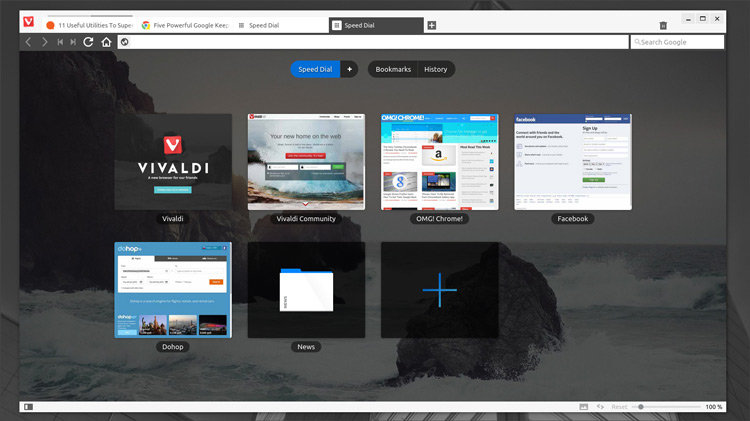
vivaldi browser
A brand new web browser has arrived this week that aims to meet the needs of power users — and it’s already available for Linux.
Vivaldi is the name of this new browser and it has been launched as a tech preview (read: a beta without the responsibility) for 64-bit Linux machines, Windows and Mac. It is built — shock — on the tried-and-tested open-source frameworks of Chromium, Blink and Google’s open-source V8 JavaScript engine (among other projects).
Does the world really want another browser? Vivaldi, the brain child of former Opera Software CEO Jon von Tetzchner, is less concerned about want and more about need.
Vivaldi is being built with the sort of features that keyboard preferring tab addicts need. It is not being pitched at users who find Firefox perplexing or whose sole criticism of Chrome is that it moved the bookmarks button.
That’s not tacky marketing spiel either. Despite the ‘technical preview’ badge it comes with, Vivaldi is alreadypacked with features that demonstrate its power user slant.
Plenty of folks feel left behind and underserved by the simplified, paired back offerings other software companies are producing. Vivaldi, even at this early juncture, looks well placed to succeed in winning them over.

Vivaldi Features

A few of Vivaldi’s key features already present include:
quick
Quick Commands (Ctrl + Q) is an in-app HUD that lets you quickly filter through settings, options and features, be it opening a bookmark or hiding the status bar, using your keyboard. No clicks needed.
Tab Stacks let you clean up your workspace by grouping separate tabs into one, and then using a keyboard command or the tab preview picker to switch between them.
tab stacks
A collapsible side panel that houses extra features (just like old Opera) including a (not yet working) mail client, contacts, bookmarks browser and note taking section that lets you take and annotate screenshots.
A bunch of other features are on offer too, including customizable keyboard shortcuts, a tabs bar that can be set on any edge of the browser (or hidden entirely), privacy options and a speed dial with folders.

Opera Mark II

vivaldi settings in ubuntu
It’s not a leap to see Vivaldi as the true successor to Opera post-Presto (Opera’s old, proprietary rendering engine). Opera (which also pushed out a minor new update today) has split out many of its “power user” features as it chases a lighter, more manageable set of features.
Vivaldi wants to pick up the baggage Opera has been so keen to offload. And while that might not help it grab marketshare it will see it grab the attention of power users, many of whom will no doubt already be using Linux.

Download

Interested in taking it for a spin? You can. Vivaldi is available to download for Windows, Mac and 64-bit Linux distributions. On the latter you have a choice of Debian or RPM installer.
Bear in mind that it’s not finished and that more features (including extensions, sync and more) are planned for future builds.