WHAT'S NEW?
Loading...
Showing posts with label windows. Show all posts

It's been confirmed by Microsoft that Windows 10 will work at a lower resolution than both Windows 8 and 8.1 when it is released this summer.
At the Windows Hardware Engineering Conference (WinHEC) in China, the company confirmed that Windows 10 desktop PCs will only need a minimum resolution of 800 x 600 pixels in order to run the new OS, according to PC World.
Windows 8.1, meanwhile, required a minimum screen resolution of at least 1,024 x 768 to access the Windows Store to run applications in the Modern user interface. Things are even more stringent for Windows 8 users as "snap apps" require a minimum resolution of at least 1,366 x 768.
The other minimum requirements mirror that of the past two versions of the OS. This means that Windows 10 requires memory of at least 2GB for 64-bit or 1GB for 32-bit, minimum storage of 20GB for 64-bit or 16GB for 32-bit and at least DirectX 9 installed.
Another difference is the screen sizes that the Windows 10 Professional and consumer versions can run on. The Professional edition requires just a 7-inch screen, whereas the consumer iteration needs an 8-inch screen. However, both of these will be more relevant for tablet manufacturers than PC makers. Windows 10 also ships with the UEFI 2.3.1 firmware interface and each copy of the OS will have a Trusted Platform Module built-in.
Alongside this Microsoft also revealed the requirements for Windows 10 smartphones will be released at the same time as the fully featured desktop version and include a ream of different options for manufacturers of mobile devices.
Earlier this week at the same WinHEC summit, Microsoft EVP of operating systems Terry Myerson said that Windows 10 will be landing this summer without a specific date. The new OS will be a free upgrade for Windows 7, 8 and 8.1 users. Even those who own pirated versions of Windows will be able to take advantage of that offer.

How to download the Technical Preview

The latest version of the Windows 10 Technical Preview (Build 10041) was released to the "fast" ring yesterday with a number of tweaks including start menu transparency, enhancements to the Virtual Desktop experience, new languages in Cortana and a lot more besides.
Anyone can download the Windows 10 Technical Preview by signing up as a Windows Insider right now to try it out before its commercial release lands in the summer.
Microsoft dropped an interesting piece of information today amid its confirmation that Windows 10 will go on sale this summer.
Near the end of its announcement, the Redmond-based company casually revealed that it is testing Windows 10 with “power users” of Xiaomi’s flagship Mi 4 Android smartphone. The initiative, which Xiaomi stressed is not a partnership but merely assistance with the trial, is an interesting one because it again shows Microsoft’s new ‘platform agnostic’ approach.
Neither Microsoft nor Xiaomi provided specific details of the Windows 10 software being trialled, but TechCrunch understands from sources that it effectively overrides Android, turning the Xiaomi phone into a Windows 10 device complete with Microsoft services. (Which the company hopes will dazzle Android owners into making the switch.)
That’s to say that the software doesn’t offer a dual boot option, which Microsoft has pushed in the past in India. This is a ROM, based on Windows, that operates much like software from Cyanogen — a company Microsoft was incorrectly linked with an investment in— and other custom ROMs developed by the likes of Tencent and Baidu in China.
The ROM is thus designed to go beyond Microsoft’s Android apps and offer a native-like Windows experience on Android phones.
That’s a pretty powerful concept, and it is no surprise to see Microsoft testing it in China, where consumers are more inclined to install ROMs. There’s a greater spirit of customization in China, particularly for Android users since third-party app stores are the norm as Google Play is severely restricted there.
Microsoft, of course, has big plans to make this software available on more devices in time.The company told The Next Web that full availability will be announced soon (update: full statement below), but it is starting out with Xiaomi — almost certainly because it has a strong community of users who provide feedback on the company’s weekly software updates. Xiaomi’s receptive audience is ideal for such a pilot.
A good idea though it may be, getting adoption for an Android ROM in China is no easy thing. Just ask Baidu, which recently shuttered its Android software efforts due to low interest — that’s despite the company’s vast reach and distribution potential as ‘China’s Google’.
As for Xiaomi, people are often quick to rush to the idea that it is at odds with Google since it doesn’t offer the U.S. company’s services on in MIUI platform in China. Xiaomi’s emphatic comment that its involvement in Windows 10 is not a partnership — coupled with Hugo Barra recent explanation that it is not pushing its suite of services to users outside of China — suggests that this is not tactical; Xiaomi is just giving it users another ROM to tinker with.
The news could be taken in a cynical way in the U.S. — where what’s good for the users is often convenient because it’s good for the business too — but Xiaomi really has cultivated a sizable and trusted community, so we’re inclined to believe its rhetoric on this occasion.
Update: Here are more details from Microsoft:
As part of the Windows Insider Program, Microsoft will partner with Xiaomi to offer Windows 10 free downloads to a select group of Xiaomi Mi4 users. Xiaomi Mi4 users will get the ability to flash their phones with the new Windows 10 OS and provide feedback to Xiaomi and Microsoft on their experience. This partnership will allow Xiaomi and Microsoft to get direct user feedback and continue to improve the experience for China. Microsoft is thrilled to see Xiaomi embracing Windows 10 and offering this great value to their customers. We’re excited to see the feedback we receive from this audience.
Xiaomi is a leading phone manufacturer in China undergoing significant global expansion. We are excited to partner with them in China and jointly gather feedback from Chinese users on their experience with Windows 10 to jointly collaborate on product and services development for the platform.
Availability will be announced in the months to come.

Windows 10 has a lot of welcome improvements, but there's at least one that might not be immediately obvious: it can take up way less space than past versions of the OS.
That means that upgrading to Windows 10 could provide you with almost 15GB of additional storage, depending on a number of factors, Microsoft wrote on the Windows Blog.
For one thing Windows 10 features enhanced compression that uses a new algorithm and evaluates your device's memory, compressing as many system files as possible without impacting your performance.
That alone can free between 1.5GB (on 32-bit systems) and 2.6GB (on 64-bit) across mobile, laptop and desktop devices with Windows 10.

Shaping up

On top of that Windows 10 no longer requires a separate recovery image to reset your system to factory settings. These generally come preinstalled by manufacturers, and their absence can free up another 12GB.
That advantage only applies to tablets, laptops and desktops, though, and not phones, which already don't use hefty recovery images.
"Through the capacity savings of system compression and recovery enhancements, Windows devices can be lightweight and highly mobile, yet, when you need it, have the full capabilities of the Windows OS," the team's post reads.
As long as the new compression techniques and the lack of recovery images don't cause extra problems for Windows 10 users down the line, this is a nice improvement to an OS that already looks like it's shaping up to be great.

It’s the end of an era. While Microsoft had already revealed it was working on a lightweight browser for Windows 10 codenamed ‘Project Spartan’, and dropped hints it would be an Internet Explorer replacement, a company executive has now confirmed that these two are indeed separate products, and the much maligned Internet Explorer is on the way out.
Speaking at Microsoft’s Convergence conference in Atlanta on Monday, reports The Verge, Microsoft’s marketing chief Chris Capossela said that the company is currently working on a new name and brand. Internet Explorer will still be kept around “in some versions” of Windows 10 for compatibility reasons, but the new browser -- whatever it ends up being called -- will take its place as the primary way for users to access the web from a fresh Windows 10 install.
Although it’s yet to settle on a name it’ll probably have the Microsoft brand attached to it, as in-house research shows the appeal “is incredibly high”.
microsoft internet explorer
The Internet Explorer brand gained a poor reputation in the early and mid-2000s both for security and for standards compliance. Despite Microsoft’s best marketing efforts, and actually delivering a fast and capable browser with the latest versions of Windows, it hasn’t been able to shake off the stigma.

Project Spartan will bring a streamlined interface as well as a few different features, including Cortana support, a Reading List that can save articles for offline reading and sync between your phones and PCs, and the ability to annotate and clip pieces of webpages for easy sharing.

Microsoft has finally announced that it will put Internet Explorer out to pasture when Windows 10 launches. All they need to do now is come up with a name for its replacement.
Let's be honest, there's not a huge amount wrong with Internet Explorer these days. And even if there is, Firefox and Chrome are just as bad in their own way. So while Microsoft's decision to kill off the name "Internet Explorer" is sad, it's also not that much of a surprise. After all, post-IE6 its name has more or less been mud.
Speaking at Microsoft's "Convergence" event Chris Capossela, CMO for Microsoft, suggested that the new version of IE, known as Project Spartan, would not entirely replace the old browser. Instead, Windows 10 would have both, with IE being used for fallback where compatibility was needed.
Meanwhile there's a suggestion that it will only be in certain versions of Windows 10 that IE will remain, but that will probably only apply to the Enterprise editions, where some business users might have "mission critical" apps that rely on IE to operate.

What's in a name?

Apparently testing has already been done on some names, but when Microsoft asked Chrome users what name they liked best, they usually opted for one that had "Microsoft" at the start.
So the new browser might be called Microsoft Spartan, or something similar. Clearly the Microsoft brand carries some weight behind it, and it's not all negative, which is good to know.
It's also worth remembering that the move away from IE might have some benefits for Microsoft's cross-device strategy. For one thing, the new browser might work on Windows Phone, Windows 10 and Xbox One. This move to one set of code is something everyone should be very excited about, not just for the new browser but for apps in general.

Office 365 has roared back against Google Docs in the battle for enterprise customers after Microsoft's decision to start persuading companies to ditch Exchange email in favor of a comparable cloud service.
Usage of Office 365 has reportedly "skyrocketed" over the past six-to-nine-months after Microsoft apparently began to advise customers to migrate email to service based on the Microsoft cloud and not one using an Exchange server based at the company's own data centres.
The admission comes from Todd McKinnon, CEO of Okta, a firm that allows companies to keep track of employee passwords and accounts for all cloud services they use, who has seen Office 365 pass both Google Docs and Box, and it will pass Salesforce on in the next few months. That is in stark contrast to a survey taken in October 2014 that showed Google Docs was the most popular all round with Salesforce and Box most popular at work.

Huge growth since last year

McKinnon isn't the only one either. BetterCloud, which was originally 100% focused on security tools for Google Apps, launched an Office 365 beta two weeks ago, and BitGlass, has seen Office 365 overtake Google Apps for usage, a significant jump after a survey it carried out a year ago shows that 16% of its customers used Google Apps whereas under 8% used Office 365.
Microsoft also reportedly signed a deal earlier this month to bring Office 365 as well as OneDrive and OneNote to Samsung's Knox Workplace suite of enterprise apps, something that has the potential to set even more alarm bells ringing at Google.

Microsoft has reportedly started rolling out the Windows Phone 8.1 GDR2 update, or Windows Phone 8.1 Update 2, to certain handsets, and with it bringing a few new features to the platform.
As per user reports (via Windows Central) the new features deal largely with the smartphones' Settings interface. A full changelog has yet to be published.
The Windows Phone 8.1 GDR2 update divides the Settings UI into categories, and brings the option to pin individual settings on the home screen. It is worth noting that these features were previously available for the Windows Phone handsets but via third-party apps.
Windows Phone 8.1 Update 2 also brings the support for Bluetooth keyboard, which was unveiled during the MWC 2015 trade show by Microsoft. Furthermore, the Redmond-based tech firm appears to have slightly changed the app permission settings letting Windows Phone users disable access to certain function like camera or other privacy features, on per app basis.
Lastly, the Windows Phone 8.1 GDR2 update has introduced a new feature called "quick text", which is nothing but a set of pre-defined phrases users can bring up on the keyboard to send as a quick response. The full changelog for the Windows Phone 8.1 GDR2 update has not been mentioned as of now.
In February, Microsoft started rolling out the Lumia Denim update in India, which includes features like Cortana, Live folders, Apps Corner, SMS merge and forwarding, Snooze Times, Consumer VPN, and Internet Explorer improvements. The update also adds certain exclusive features to Lumia devices, such as bringing the Lumia Camera app to select devices (Lumia 930, Lumia Icon, Lumia 1520, Lumia 830), and other camera improvements, apart from the Glance screen, and Hey Cortana voice activation (only on Lumia 930 and Lumia Icon).

Windows 10 Technical Preview for phones is now available to download. This is a pre-release version of Microsoft's upcoming mobile operating system. You should only download this if you want to try a new operating system on your Windows Phone device. Since this is beta software, many of your favourite apps may not work on it and upgrading to it right now is not recommended on your primary phone as the preview is still very much a work in progress.
If you have a spare Windows Phone device lying around or if you love playing around with latest (potentially buggy) builds of operating systems, then read on.
Supported devices
Currently, Microsoft says only six Lumia phones can download and install Windows 10 Technical Preview for phones. These are:
  • Lumia 630
  • Lumia 635
  • Lumia 636
  • Lumia 638
  • Lumia 730
  • Lumia 830
More phones will be supported in future builds, but for now only users of the phones listed above can try Windows 10 Technical Preview.
Backing up your data
This is beta software and hence can be very buggy. That's why we recommend that you make a complete backup of your Windows Phone first. We have written a detailed guide on how to backup and delete all data on your Windows Phone device and you must go follow all the steps listed there before proceeding.

Downloading and installing Windows 10 Technical Preview for phones
The process for downloading Windows 10 Technical Preview for phones is not too hard, especially if you know how to download and install Windows 10 Technical Preview on your PC. Follow these steps.
  1. Head to the Windows Insider page.
  2. Click Get Started to sign up for the programme.
  3. Enter your Outlook.com email address and password.
  4. Click Sign in.
  5. Read the terms of service, scroll down and check I accept the terms of this agreement (required).
  6. Click Submit.
  7. Scroll down and click Phone.
  8. Scroll down and click Get the preview.
  9. Download the Windows Insider app on your Windows Phone device.
  10. Open the app and sign in using your Microsoft account.
  11. Tap Get preview builds.
  12. Here you'll have to choose between receiving OS updates as they're released or after some bugs have been fixed. Tap Insider Fast to stay on the bleeding edge or pick Insider Slow if you'd like a slightly more reliable build.
  13. Take a look at all the warnings and then tap Accept.
  14. Tap the Windows button on your phone.
  15. Go to Settings > Phone Update.
  16. Tap Check for updates.
Now you'll be able to download the latest Windows 10 builds for your smartphone. Tell us about your experience with Windows 10 on mobile and PC via the comments. 
windows_10.jpg
Microsoft has revealed more details about its Windows universal apps and has also talked about how the Windows 10 universal app platform will work. Additionally, the company has announced its upcoming Build conference will be held from April 29 to May 1. Further universal app platform technical details will be announced at the Build Conference in San Francisco.
Microsoft's Kevin Gallo, technical lead for Windows universal apps, in a blog post titled "A first look at the Windows 10 universal app platform" gave some insights of the universal app platform.
Explaining the need of consumer's needs, Gallo stressed that "mobile experiences" have evolved. "Until now, mobile experiences have largely meant app and web experiences built for mobile devices - most often defined by the phone you carry with you," he adds. Gallo goes on to suggest that the new "world of mobile experiences" requires support of number of screen sizes alongside flexibility in interaction. He gave an example of a user who works across various devices supporting touch gestures (in case of mobiles and tablets) to keyboard and mouse (on desktop), and to bridge such a gap devices such as 2-in-1 are launched.
"As we built the universal app platform, we set out to ensure that all Windows developers would equally benefit from this one core. The platform enables a new class of Windows universal apps - apps that are truly written once, with one set of business logic and one UI. Apps that are delivered to one Store within one package. Apps that are able to reach every Windows 10 device the developer wants to reach. Apps that feels consistent and familiar to the customer on all devices, while also contextually appropriate to each device's input model and screen size. The new universal app platform completes our developer platform convergence by providing you with the ability to finally create one app that can run on mobile, desktop, console, holographic, and even IoT devices," blog notes.
Gallo further explained "adaptive user experience" that will allow app UI to "fluidly adapt at runtime based on how the customer is interacting with your app." Microsoft also stressed that Windows 10 will make it easy for developers to "incorporate natural user inputs into your app."
"Because Windows handles all of these inputs, we free you from needing to worry about how to parse the input for meaning - you only need to worry about which inputs are appropriate for your app and we'll determine if they are present and parse the intent for you," he adds.
In the blog, the company confirmed that Windows 10 has been designed to support existing Windows and desktop apps. Microsoft goes on to suggest that the same design frame will maintained through devices including the HoloLens, Surface Hub, and IoT devices like the Raspberry Pi 2. The company confirmed more details will be shared at the Build conference in April.
The company announced Universal Windows apps, a move that claimed to bring a new common Windows runtime to PCs, phones, and tablets (and the Xbox One) at last year's Build conference. With the launch of Windows 10 in September, Microsoft came closer to its vision of universal apps that will allow apps to work across a variety of devices (from phones to tablet to gaming consoles).


Microsoft announced two new phones yesterday, the Lumia 640 and the Lumia 640 XL. The inexpensive devices are designed to handle global communications, built with dual-SIM slots and the like. They also included something curious: Free Office 365 for a year.
The company currently offers a Surface bundle that includes Office 365, and a cheap HP laptop recently shipped with the same. To my knowledge this is the first Windows Phone device to come equipped with an Office 365 subscription. I’m vamping with Microsoft to confirm the point.
Given the low price of the phones, it’s an almost surprising move. Consumers will be able to pick up the larger XL device at its highest price point for around $250, sans a new contract. Office 365 costs between $70 and $120 per year, depending on the consumer package selected, and how it is financed. That’s a material percentage of the price of the phone.
Of course, the marginal cost to Microsoft to provide Office 365 to a new customer is essentially nil.
But is the company foregoing Office revenue to help make its money-losing hardware assets move more units? Or put more simply, is Microsoft curtailing a profit source to fuel a money pit? No, but there is some nuance to the situation.
What matters here is that whoever builds the hardware gets to decide what operating system it runs, and what apps come pre-installed. When Microsoft ships a handset, it comes with Windows — soon, Windows 10 — and apps that Microsoft would like you to use. It also functions with a user’s Microsoft account, to which the company has stapled other cloud products and services that it, again, would like more people to use.
So the sale of a phone for Microsoft, along with Google and Apple, is a simple way to grow market share for mobile services and desktop-focused cloud services. That doesn’t conclude our question, however, as it is simple to ask the following: If Microsoft wants to grow its revenue from services and software, why give Office 365 away at all?
The answer, as you have already come to yourself, is that Microsoft is passing on a potential sale of Office 365 for a year, to entice a customer to its mobile platform for likely longer than a year, and also bring them into its orbit of services that the user will, presumably, want to keep using after the free period has lapsed.
So that’s a sold phone, a good shot at a new Office 365 customer, and some income along the way from apps and search. From that perspective, the financial gambit makes sense.
Microsoft previously stated that its phone business would reach “operating break even for the Phone business in fiscal year 16.” Given that the firm has produced no new guidance, we can presume that the above fits under the projection’s financial rubric. It will be interesting to see how Microsoft includes the new subscribers in its quarterly reporting of key performance indicators, or KPIs, that include a number of consumer subscribers to the consumer side of Office 365.

An Effective Carrot?

At question is how enticing free Office is for consumers, in terms of how it might drive hardware sales, and how many users will convert to paying subscribers after their year of free access ends. From a margin perspective, the end-of-year moment is when a phone might actually drive profit: Sell the phone at break-even, give away Office 365 for free for a period, and then cash in on the massive margins that software can provide thereafter, presuming that the original purchaser subscribes.
A $100 software sale that was originally predicated on a hardware sale would grant pleasant margins to each business group involved, and the larger Microsoft corporation would be content as well, having both its halves turning over at a decent clip.
Given that a similar strategy has been deployed across phones, tablets and laptops, it is fair to point to a trend: Microsoft thinks that it can improve hardware sales, and thus adoption of its platforms, by using software as sweetener.
Spending margin, at least in theory, to build share, is hardly revolutionary. But if Microsoft can make it work in this case, a legacy business in transition will have assisted the company in pulling off a multi-billion-dollar bet. I suppose in the changing landscape of technology, that shouldn’t surprise.

You know those awful romantic comedies where two would-be suitors accidently bump into each other and form an instant mutual dislike before eventually realising that, gosh, they actually have a huge amount in common?
That's what I feel I've just seen at MWC 2015, though instead of a beautiful American actress and a bumbling and foppish British guy, we have the less than glamourous Ubuntu and Windows starring as the star-crossed lovers.
Microsoft and Canonical, the companies behind Windows 10 and Ubuntu, have been showing their visions for putting desktop operating systems on mobile devices.
I met up with both here in Barcelona, and came away from the latter with a tremendous sense of déjà vu, as the two companies seem to have far more in common than they (and their supporters, especially on Ubuntu's side) would like to admit.
Both have acknowledged that desktop PCs are a dying market, though Microsoft won't directly admit it, instead offering token support for desktops by bringing the Start menu back to Windows 10.
Canonical is far more forthright, with Cristian Parrino, Vice President of Mobile and Online Services at Canonical, straight up telling me that "PCs are a fading market".

The coy damsel and straight-talking player

They're doing that stereotypical rom-com thing: despite the way they say it, they're both saying the same things.
They mutually want desktop apps to work on mobile devices, though where Canonical says "convergence" in a rather unsexy way, Microsoft says "unified" like an emotionally-stunted Vulcan.
Both want their app stores to be the hip place to download your software, and both will have to come to terms with the fact that that will probably never happen.
And what's a romantic comedy without the comedy? During my demo of Windows 10 for Phones the enthusiastic Microsoft representative brought up Cortana to search the web. The top search that was displayed? "I don't like my Cortana", something that grated with the head-bobbing-but-ultimately-there-for-the-cash Surface-toting DJ smashing out the bangin' tunes in the background.
Ubuntu was going down the opposite route, trying to appear smart, crisp and respectable... while failing to hide its rough edges with plenty of bugs and crashes during my demo.
So, despite their differences on the surface, both Windows 10 Mobile and Ubuntu aren't that different at all. Will they finally realise this and run towards each other, arms outstretched while a Coldplay song or some other pap plays in the background? MWC 2015 isn't over yet…

Internet Explorer is the past - Project Spartan is the future. Microsoft's super-fast, clutter-free browser for the future is on its way and the Redmond company has just confirmed you'll be able to try it out yourself in the next preview release of Windows 10.
When exactly that's going to drop is a matter of some speculation, but most rumors point to the end of this month, or perhaps even sooner. Microsoft's Kevin Gallo made the announcement at Mobile World Congress in Barcelona.
We also saw a brief demo of Spartan running on a Windows Phone device at MWC today. It looks very similar to the desktop edition, as you would expect with Microsoft aiming to stretch the same Windows 10 apps across all devices and screen sizes.

This is Spartan

So what can you expect from Project Spartan? The browser sports a darker, simpler skin and accepts pen and keyboard input right out of the (virtual) box. You'll be able to mark up web pages and share your notes with others.
There's a reading mode, as with most other browsers, and offline support for caching sites if you want to catch up with your reading while you're away from a data connection.
Cortana is directly integrated with the software, as you would probably expect, and Microsoft is working on getting the desktop version ready before it rolls it out to phones. Once the next Windows 10 Preview arrives, it will have a whole new army of beta testers to help out.
5 ways Ubuntu is better than Windows
Recently Microsoft has launched Windows 10 with the announcements that there are some great new additions to the operating system. And the fact is Microsoft has been remaining as the first choice for single user for choosing their operating system for years. But there are a few reasons why Ubuntu is better than Windows and can change your mind to work with Ubuntu.

5 ways Ubuntu is better than Windows as follows.

1. Price

Currently users using Windows 7 or Windows 8.1 will get free Windows 10 for one year as per the announcement done by Microsoft. Whereas Ubuntu is free and open source which you can DOWNLOAD it right now. Any user gets any kind of edition he/she wants of Ubuntu i.e. Desktop edition, server edition for free. They all are free for lifetime and can be used on as many computers you want. So, Microsoft doesn’t beat Ubuntu as it is freer forever rather than just only one year.

2. Installation

While installing Windows on your computer, you should have to install all the required drivers to work Windows operating system correctly on your computer. Whereas with Ubuntu, You install the operating system using the easy installer and once it’s finished you are all set, no extra drivers to get install.
And the main problem occurs with average user when he/she wants to install a fresh copy of Windows on the computer from which is already installed and outdated version but problems start to occur.

3. Customization

Customization of your Windows operating system is not an easy task unless you are an advanced user or you very well know where to look. You really have to know what you are doing when doing customizations or you can compromise the integrity of your system. There just aren’t very many easy ways to make things look the way that you want them to look and act the way that you want them to act.
But in case of Ubuntu you can learn how to tweak your Ubuntu machine to look and feel the way you want by help of google search. For e.g. If you want to change the icons only few clicks are needed to do that. You can have different desktop environments of your choice. And with the help of Unity Tweak Tool, you can save all your customization options in it so that you can use whenever you want.

4. Security

A Windows user gets regular security updates which annoys anyone every time. And some of the updates are like which are of no use to an average user, such as bloated anti-virus programs that pop-up advertisements persuade you to download or that manufacturers pre-install on your computer in an effort for you to sign a deal with one of their partners.
But now Windows has built security system called Windows Defender ethics started becoming integrated into Windows. The problem is that it is still very easy to install virus on your windows computer due to the design of the operating system.
Ubuntu is better than Windows because it doesn’t have such problems as it has always had a rock solid reputation for security and that’s why so many servers worldwide chooses it over Windows.
So Security is the main reason why we use Ubuntu as everything else is just icing on the cake.

5. User Experience Design

This is kind of personal opinion as from my point of view Ubuntu looks and works much better than Windows. Many times while working things get messed up as it takes the load and eventually I get frustrated.
The new tiles UI that are launched by Microsoft in Windows 8 are the weirdest thing I have ever seen IN UI designs, ugly colors and sharp edges of the windows which seems to be outdated compare to Ubuntu’s well designed icons, an attractive dark windows theme with rounded corners and auto hide menu bar which looks beautiful.
Serious people are saying Ubuntu is better than Windows 8 on tablets – Mark Shuttleworth, ZD Net
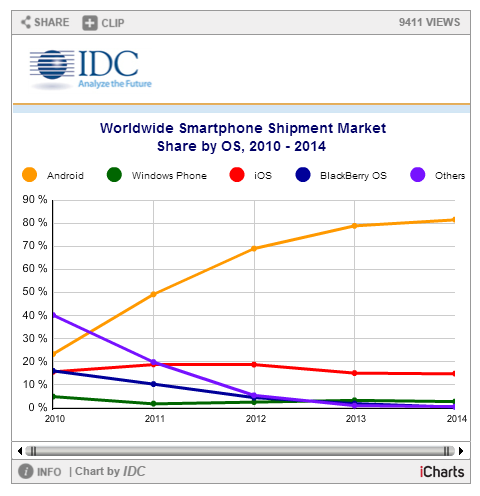
FRAMINGHAM, Mass. February 24, 2015 – Android and iOS inched closer to total domination of the worldwide smartphone market in both the fourth quarter (4Q14) and the calendar year 2014 (CY14). According to data from the International Data Corporation (IDC) Worldwide Quarterly Mobile Phone Tracker, Android and iOS accounted for 96.3% of all smartphone shipments, up slightly from 95.6% in 4Q13 and from 93.8% in CY13. In terms of year-over-year shipment growth, Android outpaced the overall smartphone market for CY14 (32.0% vs 27.7%, respectively) while iOS beat the market in 4Q14 (46.1% vs 29.2%, respectively).

"Many of the same drivers were in play for Android and iOS to tighten their grip on the market," said Ramon Llamas, Research Manager with IDC's Mobile Phone team. "A combination of strong end-user demand, refreshed product portfolios, and the availability of low-cost devices – particularly for Android – drove volumes higher.

"What will bear close observation is how the two operating systems fare in 2015 and beyond," added Llamas. "Now that Apple has entered the phablet market, there are few new opportunities for the company to address. Meanwhile, Samsung experienced flat growth in 2014, forcing Android to rely more heavily on smaller vendors to drive volumes higher."

"Instead of a battle for the third ecosystem after Android and iOS, 2014 instead yielded skirmishes, with Windows Phone edging out BlackBerry, Firefox, Sailfish and the rest, but without any of these platforms making the kind of gains needed to challenge the top two," said Melissa Chau, Senior Research Manager with IDC's Worldwide Quarterly Mobile Phone Tracker.

"This isn't to say that vendors aren't making moves, especially for the growth segments – the low-end markets," continued Chau. "With Microsoft bringing ever-cheaper Lumia into play and Tizen finally getting launched to India early this year, there is still a hunger to chip away at Android's dominance."

Smartphone OS Highlights

Android pushed past the one billion unit mark in 2014, a significant milestone by itself but also because total Android volumes in 2014 bested total smartphone volumes in 2013. Samsung retained the leadership position by a wide margin, shipping more volume than the next five vendors combined. At the same time, Samsung's total volumes for the year remained essentially flat while Asian vendors including Huawei, Lenovo (including Motorola), LG Electronics, Xiaomi, and ZTE fueled the most growth for Google's platform.

iOS saw its market share for 2014 decline slightly even as volumes reached a new record and grew at nearly the same pace as the overall smartphone market. Much of this was due to the strong demand for Apple's new and larger iPhones and the reception they had within key markets. What remains to be seen is how Apple will sustain demand going forward, as larger screens were among the last gaps in its product portfolio.

Windows Phone had the smallest year-over-year increase among the leading operating systems growing just 4.2%, well below the overall market. Having finalized its acquisition of Nokia in the spring of 2014, Microsoft relied primarily on a long list of entry-level Lumia devices to maintain its position in the market, and relied on its partners HTC and Samsung to provide cover on the high-end of the market. With the launch of Windows 10 later this year, Windows Phone stands to make a more concerted effort to return to the high end of the market.

BlackBerry posted the only year-over-year decline among the leading operating systems, falling -69.8% from 2013 levels. 2014 marked a year of rationalization for the beleaguered platform, and by the end of the year the company had revealed multiple enhancements to its platform and new device additions with the BlackBerry Passport and BlackBerry Classic. CEO John Chen anticipates 10 million units will be shipped in 2015, returning the company to profitability and marking a 72% increase over the 5.8 million units shipped in 2014.


Top Four Smartphone Operating Systems, Unit Shipments, Market Share, and Year-Over-Year Growth, Calendar Year 2014 Data (Units in Millions) 
Operating System
2014 Unit Volumes
2014 Market Share
2013 Unit Volumes
2013 Market Share
Year-Over-Year Change
Android
1,059.3
81.5%
802.2
78.7%
32.0%
iOS
192.7
14.8%
153.4
15.1%
25.6%
Windows Phone
34.9
2.7%
33.5
3.3%
4.2%
BlackBerry
5.8
0.4%
19.2
1.9%
-69.8%
Others
7.7
0.6%
2.3
0.2%
234.8%
Total
1,300.4
100.0%
1,018.7
100.0%
27.7%


Source: IDC Worldwide Quarterly Mobile Phone Tracker, February 24, 2015


This chart is intended for public use in online news articles and social media. Instructions on how to embed this graphic are available by clicking here.


Top Four Smartphone Operating Systems, Unit Shipments, Market Share and Year-Over-Year Growth, Q4 2014 (Units in Millions) 
Operating System
4Q14 Unit Volumes
4Q14 Market Share
4Q13 Unit Volumes
4Q13 Market Share
Year-Over-Year Change
Android
289.1
76.6%
228.4
78.2%
26.6%
iOS
74.5
19.7%
51
17.5%
46.1%
Windows Phone
10.7
2.8%
8.8
3.0%
21.6%
BlackBerry
1.4
0.4%
1.7
0.6%
-17.6%
Others
1.8
0.5%
2.3
0.8%
-21.7%
Total
377.5
100.0%
292.2
100.0%
29.2%


Source: IDC Worldwide Quarterly Mobile Phone Tracker, February 24, 2015
Note:
  • Vendor shipments are branded shipments and exclude ODM sales for all vendors. The vendor names reflected in this release represent the current parent company (or holding company) for all brands, regardless of the date of mergers or acquisitions.
About IDC Trackers
IDC Tracker products provide accurate and timely market size, vendor share, and forecasts for hundreds of technology markets from more than 100 countries around the globe. Using proprietary tools and research processes, IDC's Trackers are updated on a semiannual, quarterly, and monthly basis. Tracker results are delivered to clients in user-friendly excel deliverables and on-line query tools. The IDC Tracker Charts app allows users to view data charts from the most recent IDC Tracker products on their iPhone and iPad.
For more information about IDC's Worldwide Quarterly Mobile Phone Tracker, please contact Kathy Nagamine at 650-350-6423 or knagamine@idc.com.
About IDC
International Data Corporation (IDC) is the premier global provider of market intelligence, advisory services, and events for the information technology, telecommunications, and consumer technology markets. With more than 1,100 analysts worldwide, IDC offers global, regional, and local expertise on technology and industry opportunities and trends in over 110 countries. IDC's analysis and insight helps IT professionals, business executives, and the investment community to make fact-based technology decisions and to achieve their key business objectives. Founded in 1964, IDC is a subsidiary of IDG, the world's leading technology media, research, and events company. To learn more about IDC, please visit www.idc.com. Follow IDC on Twitter at @IDC.