WHAT'S NEW?
Loading...
Showing posts with label window10. Show all posts

1 ) Introduction & Performance Boost : 

Windows 10 PCs are going to run the usual gamut from the familiar – tablets, notebooks, 2-in-1s, desktop PCs and mini PCs you can mount behind a screen – to the unusual, like HoloLens and Internet of Things devices.
We got an advance glimpse of the hardware that's going to be built thanks to the agenda for WinHEC, the Windows Hardware Engineering Community. And it looks like lots of the new technologies we saw previewed at CES this year will make it into devices.
Some of the most interesting new features supported pertain to connectivity – plugging in devices, docking a tablet when you need more ports and a bigger screen, or sending content to a big screen.
Microsoft is promising "Miracast improvements in Windows 10" as part of the move to WDDM 2.0. You've needed WDDM 1.3 graphics drivers for Miracast in Windows 8.1, along with a Wi-Fi card that can set up the Wi-Fi Direct network between your PC and the screen you're sending to, plus a GPU that has Hybrid Graphics – both a low-power integrated graphics processor and a dedicated GPU that can drive the second screen.
Miracast is useful when you want to project your whole PC screen to another display without plugging in a cable, whether that's to watch a movie, or give a presentation or product demonstration, but it's been tricky to set up. The improvements may simplify that – we've been able to get Miracast adapters like the Roku 3 working on devices running the Windows 10 preview when we couldn't stream with the same hardware and Windows 8.1.
But Microsoft will also be talking about what sounds like a more generic version of Wi-Fi video streaming for Windows 10 – what it calls "Wi-Fi casting and hang detection with recovery".
Unlike AirPlay and Chromecast, Miracast doesn't use your main Wi-Fi network, it creates a separate Wi-Fi Direct network between the PC and the Miracast screen. Perhaps Wi-Fi casting will add an option to stream over a standard Wi-Fi network (today you can do that with Play To, but only from specific applications and only with specific video formats, not for everything on your screen).

Get connected

Windows 10 gets support for the new reversible, either-way-up USB type-C portsand connectors that we've been expecting, so we should see those showing up on new phones, tablets and notebooks.
We saw motherboards with both USB 3.0 and type-C, and now that phones will run Windows 10, you'll be able to plug USB peripherals in to them as well as plugging your phone into your PC.
That's why Windows 10 will add support for USB Dual Role, where the same device can be either a host that other USB devices connect to, or a USB device that connects to another host – or it can be both at the same time. That also lets you plug a screen into your PC over USB.
USB type-C ports also carry more power than USB 2.0 and 3.0 – Windows 10 will support the full 100W power that USB type-C can handle, so you'll be able to charge your notebook over USB. That's ideal for docking stations; instead of a custom docking connector, a tablet or notebook can just plug in with USB and you'll get power and display connections.
That works because Windows 10 supports another new USB feature, Alternate Modes. Instead of using the usual USB protocol to transfer information over a USB connection, devices will be able to use different protocols like DisplayPort, Thunderbolt or MHL. So with the right cable, a tablet that only has a USB port could drive a monitor that needs a DisplayPort connection. That makes it much easier to design a nice, lightweight tablet that you can use like a full PC when you get to the office.
Microsoft is suggesting to OEMs that Miracast and USB type-C will be great for docking tablets and notebooks, and Windows 10 will also support the new 60GHz WiGig technology. That's a faster wireless connection than Wi-Fi – we've seen speeds between 7 and 12Gbps – but it goes over a much shorter distance. You could use it to send video from your phone or PC to a TV with a WiGig adapter in the HDMI port.
But where it gets really interesting is when you replace the USB or custom port you use to plug a keyboard into a tablet with a WiGig connection. Now you don't need a port that lets dust and water in, or special holes and guides to get the keyboard in exactly the right place to connect to the port. You can just put the keyboard next to the tablet and it will start working without all the fiddly bits of plugging it in.
Doing away with a port will make the dock and the device slightly cheaper and more reliable (often, it's the port that breaks rather than anything else in a dock). Supporting all these options should mean we see Windows 10 PCs with interesting connection and docking options.

Performance boosts

It appears that Microsoft is also emphasising the importance of improving performance and battery life, with new tools like a Battery Estimation Engine that shows which apps, services and hardware on the PC are using power, and a new Battery Saver mode. It sounds like PC makers will have to make some changes to their drivers to make those work well.
Windows 8 introduced Connected Standby mode, which lets PCs using low-power System on Chip CPUs like ARM, Atom and the latest Haswell Core processors (including Surface Pro 3) drop into a low power mode where the CPU and memory aren't using power, but Wi-Fi is still connected so email can arrive and a Skype call can wake the device up if you've allowed that.
Windows 10 also adds a new Modern Standby mode. We don't have any more details about this – perhaps it will work with a wider range of hardware than Connected Standby, or allow Bluetooth Low Energy devices to work with a PC in Modern Standby so you could wake it from an external keyboard or find it when it's turned off? Or it might be a version of Connected Standby for the way phones work.

2) Sensors and Security :

Now that Windows Phone won't be a separate OS any more, there are more phone-like features going into Windows 10. Windows 8.1 already supports Bluetooth LE for things like low power keyboards and even wearable devices like the Fitbit. That's still in Windows 10, but there's also an SMS router and "Host card emulation for NFC payments". That's the same technology that Google just bought Softcard for, letting you tap with your phone – or your tablet – to make a payment.
That session also covers "proximity features" – Microsoft has often talked about using NFC in a tablet or PC keyboard to make it easier to pair peripherals or to let you send content you're viewing on one device to another, like switching video from your phone to your TV when you get home.
Phones are also one of the reasons Windows 10 will support new sensors in addition to the usual accelerometers, ambient light sensors, compasses, gyroscopes and so on. These 'new' sensors are already used in phones and the OEMs need them.
At least one Windows Phone device (the Lumia 1020) has a barometer in – although Windows Phone 8 doesn't let developers use it – and several Samsung and Nexus handsets also have barometers in, and they're common in GPS devices. They're not for weather purposes, though – knowing the atmospheric pressure is a good way of checking the altitude and that speeds up getting your GPS location. That saves power because you can turn off the high power GPS radio more quickly, and it will work in Windows 10.
Similarly, supporting long range proximity sensors is key for phones – it's how the phone knows to turn off the screen when you're holding it up to your ear, so the side of your face doesn't activate the touchscreen and hang up your call. You could also use them to turn on an NFC sensor only when there was something near it to read, which might also save power.
Windows 10 also supports custom and composite sensors. In the past PC makers could build in any sensor if they wanted to write the driver for it themselves, but making that easier is important for Internet of Things devices that need a much wider range of sensors.

Low hardware requirements

Microsoft is also keen to attract OEMs who've previously made devices using Android or Chrome OS and other operating systems, promising them that "you can reuse many of your existing designs from other platforms on Windows". Supporting more sensors will help OEMs build Windows devices more quickly, and it suggests that the hardware requirements for Windows 10 PCs will be pretty low.
That fits with what OEMs have asked Microsoft for – to let them use the same systems they might otherwise put Android on, and it means the flood of cheap Windows tablets should continue. But that does also mean they might miss out on some Windows 10 security features. 

We already know security is a major area for Windows 10, and it makes sense that Microsoft will be pushing OEMs to put TPMs in Windows 10 PCs because new features like FIDO-compliant next-generation credentials and enterprise lockdown won't work without them.
Back in 2013, Microsoft said that by January 2015 all PCs would have to have a Trusted Platform Module to get a Windows logo. But that requirement went away last year, probably as part of the 'Bing for Windows' licence deal – OEMs making cheap Windows tablets don't want to spend the few extra dollars to add a TPM, so some 8-inch Windows tablets have a TPM, but others don't.
The Windows Hardware Certification documents currently say "Systems that support Connected Standby must also have a TPM". Microsoft can't tell PC makers they can reuse the same hardware they bought to make Intel-based Android tablets (which don't use the TPM) and then make them have a TPM in every PC. But it can push the idea by pointing out that you need them for password replacements – especially on tablets people will take to work, for mobile payments using that NFC support, and for streaming copy-protected ultra-high definition content.
After all, what Microsoft wants – and will be pushing at WinHEC – is not just lots of PCs at low prices, but a wide range of PCs from cheap tablets to high-end systems with features you can't get in Macs or Chromebooks.

OUR EARLY VERDICT

Windows Phone 10 is a big step for Microsoft's usually overlooked operating system but I don't feel it'll be the step to make it the major player it wants to be.

FOR

  • Fantastic new design
  • Intuitive new settings menu
  • Smart Universal app collaboration

AGAINST

  • Project Spartan still missing
  • New features require other Microsoft products
  • Can't connect to Cortana

Microsoft unveiled a new version of its operating system last year breaking the mould and skipping ahead right to the number 10.
Windows 10's main aim was to connect its ecosystem of devices using the same apps across desktop, tablet, smartphones and even its own Xbox One.
All Microsoft devices from here on out are likely to run with a certain version of Windows Phone 10 installed, even the mega exciting Microsoft HoloLens reportedly runs in conjunction with the OS.
Windows 10 was made available at a press event before allowing our friends over at TechRadar Pro to have a go on it, but that was mostly with the desktop version of the system. This is primarily for the mobile version, yet there is a little crossover as both platforms are so closely interconnected.
Microsoft shared some more details of the platform at MWC 2015 by revealing any device currently running Windows Phone 8.1 will be upgradeable to Windows Phone 10 by the end of the year.
We managed to get a bit of hands-on time with the developer version of Windows Phone 10 at MWC.
The biggest change I found in Windows Phone 10 is the look of the OS. Each page has a translucent background meaning if you place an image as your background it'll follow you through whilst not being too distracting from the content in front.

It does add a different flavour to the design and makes it all look that little bit nicer than the boring solid colour backgrounds within WP 8.1.
The Settings menu has had some touch up changes organising it in a way you'd expect to see on desktop. Quick settings have also expanded this time around adding in a few more useful options that can be accessed within a couple of taps.

A swipe right will still get you to the list of all installed apps, but now at the top is a new section called the 'Download Tank'.
This is where all the recently installed apps will sit to make sure it's easy to access the newest software additions to your phone. It's a novel idea but I can't help but feel this section of the menu could have been better used as a selection of favourite apps.

I would prefer this space to be used for apps that I don't want to install as live tiles on the home screen but I also find easy to access, especially if they're toward the end of the alphabet and it takes what feels like forever to scroll down and find them.
Microsoft's main push with Windows 10 is the collaboration aspect meaning all Windows devices can interconnect. Universal apps means all the applications will look the same and sync across mobile and desktop devices instantly.
We managed to play around with one connected and the action center, what Microsoft calls notifications, was updated in real time. I think it's great news as it can be properly frustrating to check a notification on your phone but it doesn't notify your tablet that you've already seen it and you have to dismiss it twice.

Using the cloud you can even begin typing out a new document before picking up where you left on another device seamlessly.
When doing the hands-on though the Microsoft representative made it clear it's not certain whether Windows Phone 10 will be updated at the same time as desktops. I hope it will as the whole point of the system is collaboration between the two but there may be a bit of a delay to get it on mobile devices.
Then there's Project Spartan. Microsoft's new internet client is being kept a bit of a secret and on the few different Windows devices we used it wasn't present.
Cortana has also undergone some more upgrades to ensure it acts as the personal assistant Microsoft wants it to be.

Sadly as our experiment with the handset took place in Spain, a territory currently not receiving access to Cortana's voice control, it wasn't set up properly meaning we couldn't try out any of the new features or voice recognition software.

Windows 10 will be launching in the UK, USA and China later this year, there is still no news on when it'll arrive in Australia.

Early verdict

A brief amount of time with the Windows Phone 10 platform shows some real promise and everything is taking a step in the right direction for the OS that always feels like it's playing catch up. Windows Phone is looking the best it has ever done and it offers more functionality than ever before.
The main focus of the new upgrade is to connect it with our Microsoft products and if you haven't got one it won't feel like the substantial update the mobile platform deserves.
For those who do have Windows 10 devices it will offer a lot more collaboration functionality meaning it'll strengthen itself as a mobile operating system but I don't think it'll ever compare to the big guns of iOS or Android.

WHAT IS A HANDS ON REVIEW?

'Hands on reviews' are a journalist's first impressions of a piece of kit based on spending some time with it. It may be just a few moments, or a few hours. The important thing is we have been able to play with it ourselves and can give you some sense of what it's like to use, even if it's only an embryonic view.
5 ways Ubuntu is better than Windows
Recently Microsoft has launched Windows 10 with the announcements that there are some great new additions to the operating system. And the fact is Microsoft has been remaining as the first choice for single user for choosing their operating system for years. But there are a few reasons why Ubuntu is better than Windows and can change your mind to work with Ubuntu.

5 ways Ubuntu is better than Windows as follows.

1. Price

Currently users using Windows 7 or Windows 8.1 will get free Windows 10 for one year as per the announcement done by Microsoft. Whereas Ubuntu is free and open source which you can DOWNLOAD it right now. Any user gets any kind of edition he/she wants of Ubuntu i.e. Desktop edition, server edition for free. They all are free for lifetime and can be used on as many computers you want. So, Microsoft doesn’t beat Ubuntu as it is freer forever rather than just only one year.

2. Installation

While installing Windows on your computer, you should have to install all the required drivers to work Windows operating system correctly on your computer. Whereas with Ubuntu, You install the operating system using the easy installer and once it’s finished you are all set, no extra drivers to get install.
And the main problem occurs with average user when he/she wants to install a fresh copy of Windows on the computer from which is already installed and outdated version but problems start to occur.

3. Customization

Customization of your Windows operating system is not an easy task unless you are an advanced user or you very well know where to look. You really have to know what you are doing when doing customizations or you can compromise the integrity of your system. There just aren’t very many easy ways to make things look the way that you want them to look and act the way that you want them to act.
But in case of Ubuntu you can learn how to tweak your Ubuntu machine to look and feel the way you want by help of google search. For e.g. If you want to change the icons only few clicks are needed to do that. You can have different desktop environments of your choice. And with the help of Unity Tweak Tool, you can save all your customization options in it so that you can use whenever you want.

4. Security

A Windows user gets regular security updates which annoys anyone every time. And some of the updates are like which are of no use to an average user, such as bloated anti-virus programs that pop-up advertisements persuade you to download or that manufacturers pre-install on your computer in an effort for you to sign a deal with one of their partners.
But now Windows has built security system called Windows Defender ethics started becoming integrated into Windows. The problem is that it is still very easy to install virus on your windows computer due to the design of the operating system.
Ubuntu is better than Windows because it doesn’t have such problems as it has always had a rock solid reputation for security and that’s why so many servers worldwide chooses it over Windows.
So Security is the main reason why we use Ubuntu as everything else is just icing on the cake.

5. User Experience Design

This is kind of personal opinion as from my point of view Ubuntu looks and works much better than Windows. Many times while working things get messed up as it takes the load and eventually I get frustrated.
The new tiles UI that are launched by Microsoft in Windows 8 are the weirdest thing I have ever seen IN UI designs, ugly colors and sharp edges of the windows which seems to be outdated compare to Ubuntu’s well designed icons, an attractive dark windows theme with rounded corners and auto hide menu bar which looks beautiful.
Serious people are saying Ubuntu is better than Windows 8 on tablets – Mark Shuttleworth, ZD Net
Microsoft finally unveiled its much-awaited Windows 10 that comes with a comprehensive range of features. To know more information about Windows 10 like when you can get it, features and improvements, you can go through this blog and share your views as well.

Build of Microsoft Windows 10
Finally, Microsoft has showed off its new and latest Windows 10 that comes with a comprehensive range of new features. Many of us were curiously waiting for this new and high-end OS that finally unveiled at the company’s press event.
Most of the demonstration of this new OS focused on enhancing the built-in apps and features of Windows Phone and fixing a lot of the oddities, including photos, mail, maps, messaging and Skype. Among all the improvements, mail is the biggest improvement to the built-in applications.
Across Windows 10 phones, PCs and tablets, the company is developing a universal outlook app that seems to be a lot better than earlier app that came with Windows 8 and Windows Phone 8.1. Further, Word is developed into the Outlook application, enabling users to author emails in a much richer way than before.
It includes complete support for inserting tables and full text formatting. You are also capable to swipe right to delete an email or you can swipe left to flag it. These are such actions that can be easily synced to the PC, so you can easily pick up your standard email at a later date.
Moving ahead, Calendar of the OS has also been enhanced, and users will also get a complete support for Gmail over their phone, tablet and PC. Apart from this, a lot of other web services can be accessed seamlessly like IMAP, POP and Exchange.
In short, we can say that Microsoft has worked very hard to provide a complete mail experience to its users that comprise full support for competitor services. If you are a Windows or Windows Phone user, you can breathe a sigh of relief.

Calendar, Photos and Mail Have Been Twisted Efficiently

On Windows 10, camera and photos have been twisted for phones. There is one common universal photos application as like Mail app across tablets, phones and PCs. With this high-end application, the images that you take with the built-in camera will be surfaced.
The basic fixed camera is the Lumia Camera now, and it features the same interface as an instant ways to capture videos and more. However, if you have a HTC or Samsung Windows Phone, you will get these enhancements as it is the default camera application. However, it is completely good change and an excellent way to avoid any confusion over which camera application to use.
Moving ahead, Maps are also getting improvements that we were expecting in Windows 10 for phones. Presently, users can find HERE maps or Bing Maps and it is a confusing mix of map apps for phones. The company is moving ahead to a single Maps app in Windows 10 for phones that comes with turn-by-turn directions and Cortana integration.
It is completely powered by Nokia’s HERE maps, but it is fully made by Microsoft company. This Map application will guide you completely if you ask for any destination no matter whether it is far away or just walking distance. The best thing about it is Cortana is always listening in the Maps app to allow this kind of functionality.

Old Start Menu With New Look

old start menu windows 10
Now, Windows 10’s start menu will expand to a full-screen view, which looks like Windows 8.1’s home screen. However, a new Android-style Action Center offers a quick access to Wi-Fi options, Bluetooth and other settings.
The settings menus themselves must be cleaned up and simpler to use. It is company’s efforts to keep the best features of desktop Windows while adapting to touchscreens. However, a new feature has been included that known as Continuum. It is especially designed for convertible devices, switching about instantly from a mouse and keyboard to a tablet screen.

Goodbye Internet Explorer & Welcome to Project Spartan

Earlier in some leads, we already saw that Windows is replacing the old Internet Explorer with a new browser that called as Project Spartan that specially designed for Windows 10.
With various new features and integration with other Microsoft services, it is a completely new cleaner browser. In this, users can find a note-taking mode which allows them to draw all over pages with a stylus or add comments with a keyboard.
Its clean reading mode also work as you expected as it formats a page like a book and adds a syncable reading list that’s basically “Pocket for Microsoft” or Safari’s page-saving feature. Spartan has Cortana built into it identifying information like restaurants or plane flights and offering extra information.

Desktop on your Phone

Desktop on your phone
As we all know that Windows 8 was a desktop/tablet negotiation, but Windows 10 has gone ahead as it is for phones too. Users can also find a build of it tailored to devices small than 8-inches that identifies the interface to look a lot more like the old Windows Phone OS.
Notifications will sync between PC and phone, and Microsoft-owned service Skype will integrate into the messaging application.

Role of OneDrive

Role of OneDrive
Well, it is true that OneDrive has not get a distinct announcement, but it was everywhere in the presentation. It is considered as a backbone of its apps enabling docs to sync across devices. Moreover, Belfiore also ribbed a biggest role for OneDrive in photos and music – for example music will sync between devices using OneDrive.

Now, Your PC is Xbox

Your PC is Xbox
As we all know that Microsoft owns a huge gaming market as the company owns a large portion of the console gaming market. Confidently, the company has figured it out due to the announcement an Xbox application for launch on every Windows 10 machine.
This application brings over Xbox One features such as friends list, messages and activity feed. On Xbox Live, you will be able to chat with people and view console achievements and videos from your desktop and record your own clips on PC.
Initially, when you will get its first look, it seems like an expanded version of Microsoft’s SmartGlass mobile application. Moreover, you are allowed to stream games from your Xbox One as its generally comparable to Sony streaming games from the Playstation 4 to the Vita.

When you will get it?

At the Press Event, Myerson also revealed some stats from the Windows 10 Technical Preview. As more than 1.7 million people have registered for Windows Insider program and they all have installed Windows 10 on approximately 3 million different PCs.
However, the all new Windows 10’s new announced features will hit PCs next week, and a Windows 10 build for phones can be obtainable after the Super Bowl.

After listening to complaints from Windows 8 adopters, Microsoft is bringing back the coveted Start menu to Windows 10. Currently available as a Technical Preview, Windows 10's new Start menu merges the Live Tiles of Windows 8 along with the more classic look of Windows 7. However, if you find the new Start screen a little cluttered, Stardock's new Start10 will take you back to the simpler times of Windows 7.
Available now as a beta, Start10 hides the Live Tiles from Microsoft's native Windows 10 Start menu. Start10 also incorporates a system-wide search feature that Microsoft is implementing on Windows 10 through Cortana's search feature.
The comprehensive search feature allows users to quickly find apps, settings and files in the search field inside the Start10 menu.
You can also skin the appearance of the start button to give you further desktop customization.

Stardock

Stardock made a name for itself when Windows 8 debuted. After users bemoaned the absence of the familiar Start menu, Stardock introduced Start8 as a way to bring back the Windows 7-styled Start menu.
The company subsequently released a number of Windows tweaks for Microsoft's touch-centric OS, including the ability to run Modern UI apps inside resizeable windows through ModernMix.
With Windows 10, ModernMix and Start8 may seem redundant as the basic functionality from Stardock's tweaks are native inside the OS. Start10 is a nice way for Stardock to differentiate its software tweaks from what Microsoft is supporting to give users more choice.

Availability

Stardock is offering Start10 to its Object Desktop users currently. Object Desktop is currently available for $49.99 or for $9.99 with a subscription cost of $3.00 per month thereafter.

Windows 10 users impatient for news of the next Technical Preview build have been assuaged by a slew of screenshots from prolific Windows leaker WZor.
The Twitter user posted various shots of Windows 10 Technical Preview build 10014 and its Professional counterpart build 10022, although anyone hoping for big changes to the OS will be disappointed.
Most of the changes are behind the scenes and concern bug fixes for device configuration, NFC, security, user experience, audio, USB and some others for File Explorer that include a maximum of four items able to be displayed in frequent folders.
Another small change is that if OneDrive is chosen as the default save location, the documents and picture folder in quick access will show the OneDrive version of those folders.

Release This Week?

New versions of the preview have been released on a fairly regular basis since September 2014 and give users a good taste of what is to come when the final product hits the market later this year.
It's unclear when the next Windows 10 Technical Preview will release for the public with this week being pegged as the possible date in some places and the latest leak will only ignite those rumours further.
Via: IB Times

Microsoft has shared more details on its upcoming Windows 10 operating system, and the strategy it hopes will win back the approval of developers and desktop users alike.
In a nutshell it’s one operating system for all devices, with one app store and apps that only need to be written once to run anywhere — from mobile to 84-inch TVs.
After an event like the one we’ve just had it’s hard to know where to start in framing Microsoft’s Windows 10 strategy and how it relates to those of us on Linux.
Sure, shiny new whistles and bells that have been long-time features of various other operating systems, including Ubuntu, were shown off as new and novel.
And the show-stopping HoloLens — which doesn’t really involve holograms and won’t be sitting on consumer faces anytime soon — opens a dialog about new ways and methods of technology interaction.
But the rest of the meat on the Windows 10 briefing plate, the context if you will, offers more substantial food for thought.

Windows – Who Cares, Right?

‘The arrogant, dominant Microsoft Linux users blindly hate ceased to exist a while back…’
Before most eyes even reach this sentence some will have rushed to hammer out a click-clacky cliched comment like “M$ SuCks!! WHO CaRES??? LYniX forEva!!’.
Such remarks are to be expected, but the arrogant and dominant Microsoft some so blindly despise hasn’t existed for a while. A humble, more open and more embracing company, though not perfect, has risen to take its place.
For the rest of us, the rich tapestry of technology we live amidst is such that no one operating system, technology company or initiative exists alone. What a company like Microsoft does has an impact elsewhere, if not always directly than certainly indirectly. The same is true of Google, Apple, Mozilla and Canonical.
My takeaway from the event was a bit different to most. It wasn’t so much what Microsoft said out loud but what it let slide underneath: that it’s sorry, that it’s changed, and that it wants to win you back.

Windows 10: Microsoft Wants You Back

win10_windows_startscreen2_Web
Windows 8, the platform that tried to mobile-ize a desktop user base neither ready, willing or equipped for it, bombed. The idea that you can force one interface everywhere and people will adapt failed.
But is Windows 10 the answer? Does it fix the flaws, raise the bar and rally the disillusioned? Not that Windows 10 is simply about wooing back refugees with the return of the Start Menu. It’s the chance of a fresh start entirely.
Let’s take a look at 10 (how original) takeaways from the event and what they might mean to Linux.

1. Windows 10 Is Free

Yes, you read that right: Windows 10 is free. Well, free-ish. You will need to own a legitimate copy of Windows 7 or Windows 8.1 to get the upgrade, and even then you’ll only have a year to nab it.
It’s a smart move that will persuade those holdouts unwilling to pay for “expensive software upgrades”.
The move also has far broader consequences than at first blush. ‘Windows as a service‘, was the mantra repeated again and again. “Always updated, for the life of the device’. After Windows 10, Windows 11 will be ‘free for a year’, Windows 12 after that, and so on.
A rapid development cycle with updates made available to all for free will help ensure users are running the latest software with the latest capabilities for developers to take advantage of.
Will a free version of Windows 10 affect the “cost” argument often put forward by Linux enthusiasts?

2. A Universal Windows Running on All The Things

A burgeoning product family
Ubuntu is already a universal operating system that runs on ‘all the things’ (something a lot of us often overlook). Sure, the experiences may not be the same at times, but it’s working on that with Mir and Unity 8.
With Windows 10 Microsoft is bringing the same version of Windows to all of its devices, ‘The broadest set ever’, it says. With Windows 10 the same operating system will run on everything, from smartphones to smart bands to devices in the hallowed Internet of Things.
And just as Ubuntu Core for smart devices is still Ubuntu, so too will the streamlined versions of  Windows 10 for embedded platforms.

3. Universal Apps — The Same App, Everywhere

With a unified platform in play, and a clever strategy to get people using it, Microsoft is giving another push to the idea of Universal Apps.
Universal Apps can be installed on a regular computer, a phone, a tablet – anywhere Windows 10 runs. They work on ARM and Intel, phone and desktop. Developers write a single application and once it hits the store it is available everywhere.
Similar to Ubuntu’s approach with QML/Qt apps (and the trend of responsive websites) developers can build appropriate “faces” in their apps to suit the kind of screen they’re being viewed on.
“The same code, running on both devices, but formatted to fit the screen,” said Microsoft’s VP of Windows Joe Belfiore, adding that it’s about giving users ‘the right interaction at the right time’.

4. Continuum — Right Face at the Right Time

win10-across-devices
Adaptable design that suits the form factor
Microsoft’s Continuum exists to solve the transition of converting a devices from one form factor to another. Continuum allows a tablet docked into a keyboard to show a desktop experience with an interaction model that will adapt to suit mouse and keyboard input. When undocked it offers to revert back to a gesture-heavy tablet UI.
This feature was demoed on 8-inch tablets but I wouldn’t be surprised if we see Intel-based smartphones able to “dock” into a desktop experience in the near future. The foundation is set. It’s up to OEMs to use it.
What might that mean for Ubuntu who’s already staked a claim in this sort of convergence? Opportunity.
If Windows 10 is used by hardware partners to make the “phone-to-pc” concept a reality it will, in turn, make it much easier for Ubuntu to land on hardware capable enough to do it (without needing to crowdfund it!).

5. OneDrive — Beyond Backups

‘OneDrive glues the multi-screen Windows 10 experience together’
OneDrive in Windows 10 is not a bolt on but part of the OS. It’s the glue that makes it easy to put one device down, pick another up and continue where you left off.
From syncing system settings to backing up your photos to enabling live collaborative features in apps. OneDrive is the glue in the multi-screen Windows 10 experience.

6. Don’t Forget The Gamers

laptop_device_xbox
Xbox, for all its shady business practices, is a key part of Microsoft’s portfolio. In Windows 10 it’s bringing a bunch of features to the desktop to ‘bridge’ the gap between PC and console.
You’ll be able to stream your gameplay from an Xbox to let you play your favourite games on your console…but on your laptop or tablet. Kind of like a BYOD Wii U, I guess.
There’s also a bunch of other stuff involving a new Xbox app that lets you share content from other games services, like Steam, with your gamer buddies.

7. Better Web Browsing

No one likes Internet Explorer, not even Microsoft. That’s why Windows 10 will offer a brand new browser built from the ground up for the web as it exists today.
It’s codenamed Spartan, is built as a Universal App, and is pretty much a patchwork of features debuted elsewhere. There’s ‘article view’ and ‘reading list’ (borrowed from Safari), ‘tab previews’ (borrowed from Opera), weird web-snipping and commenting features and even a rumoured extension framework that’s virtually 1:1 compatible with Google Chrome’s!

8. Cortana Smarts

Screen Shot 2015-01-22 at 02.32.40
Microsoft’s digital assistant Cortana is pretty impressive on the phone. Natural language and deep personalisation allows her to feel more alive than the stilted “Sorry, I didn’t catch that” Siri and more enjoyable than the passive ear that’s Google Now.
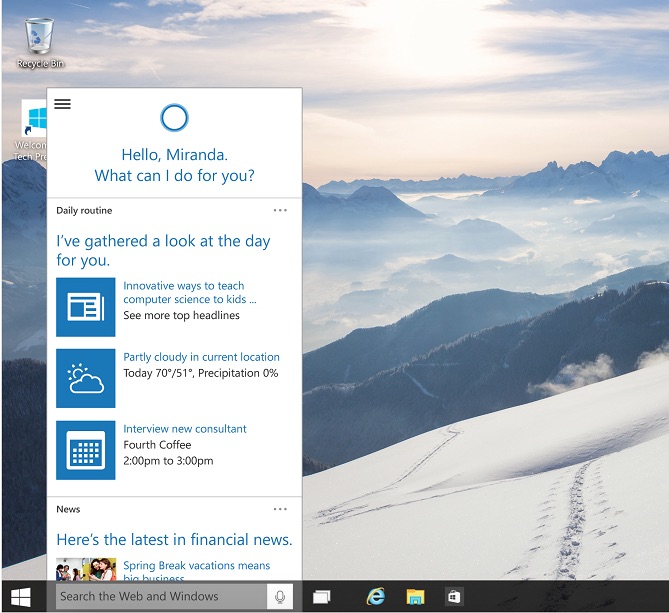
In Windows 10 Cortana is on the desktop, ready to fetch your files or open apps, take reminders, call Skype contacts and do just about everything else you can think of.

9. Better Design

One of two new devices shown off (the other being the holographic ‘HoloLens’ headset) was the Surface Hub: a huge 84-inch all-in-one PC tucked inside a 4K display with cameras, speakers and touch gestures built in.
It’s designed for enterprise (it’s essentially a TV-come-whiteboard) but is a great demonstrator of how a core OS can be used to drive different experiences. It could’ve been a “blown up” desktop or an enlarged Start Screen, but it’s not. It’s a refined, task orientated UI with all kinds of enterprise smarts literally at hand.
That design cadence extends across all of Windows 10 and validates Canonical’s approach with Unity 8 thus far.

10. Finally, A Worthy Rival for Linux

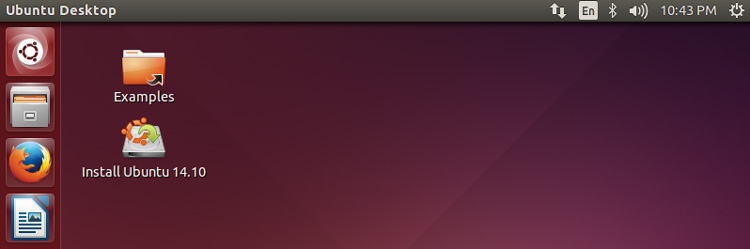
ubuntu-14.10-desktop
It sounds odd to say it, but a reinvigorated and successful Microsoft is a good thing for Linux. Competition and innovation are important, and bolder choices, be that a highly centralised option with Windows 10 or an open, distributed and freer alternative in Ubuntu.
Whether Windows is your cup or tea or not is irrelevant. New features, ideas and approaches will arrive on Linux as a result, with both inspiration and exasperation at what was unveiled driving the platforms we use forward.