WHAT'S NEW?
Loading...
Showing posts with label nokia. Show all posts

Microsoft has reportedly started rolling out the Windows Phone 8.1 GDR2 update, or Windows Phone 8.1 Update 2, to certain handsets, and with it bringing a few new features to the platform.
As per user reports (via Windows Central) the new features deal largely with the smartphones' Settings interface. A full changelog has yet to be published.
The Windows Phone 8.1 GDR2 update divides the Settings UI into categories, and brings the option to pin individual settings on the home screen. It is worth noting that these features were previously available for the Windows Phone handsets but via third-party apps.
Windows Phone 8.1 Update 2 also brings the support for Bluetooth keyboard, which was unveiled during the MWC 2015 trade show by Microsoft. Furthermore, the Redmond-based tech firm appears to have slightly changed the app permission settings letting Windows Phone users disable access to certain function like camera or other privacy features, on per app basis.
Lastly, the Windows Phone 8.1 GDR2 update has introduced a new feature called "quick text", which is nothing but a set of pre-defined phrases users can bring up on the keyboard to send as a quick response. The full changelog for the Windows Phone 8.1 GDR2 update has not been mentioned as of now.
In February, Microsoft started rolling out the Lumia Denim update in India, which includes features like Cortana, Live folders, Apps Corner, SMS merge and forwarding, Snooze Times, Consumer VPN, and Internet Explorer improvements. The update also adds certain exclusive features to Lumia devices, such as bringing the Lumia Camera app to select devices (Lumia 930, Lumia Icon, Lumia 1520, Lumia 830), and other camera improvements, apart from the Glance screen, and Hey Cortana voice activation (only on Lumia 930 and Lumia Icon).

It's well known now that Nokia's new not-quite-Android budget smartphone, the Nokia X, is fully capable of running a huge number of Android apps, even those that aren't available in Nokia's own store app. Fortunately, it's also pretty easy to find these apps and install them. We'll take you through a simple tutorial so you can take advantage of this too.
Due to competition with the Windows Phone platform and limitations of the AOSP (Android Open Source Project) fork that Nokia has created for the X family, the Google Play store is not available on the Nokia X. This means that a lot of popular apps, such as WhatsApp, aren't easily available to users.
Nokia_X_sideload_1.jpg
If apps aren't available in Nokia's own store, users have the option of checking any of four other Android app stores: 1mobile market, SlideME market, Aptoide, and Yandex Store. These are available from the Nokia store homepage as well as search results pages. Once installed, you can use any of them just as easily as the native app store.
For example, you can open the 1mobile market, and either choose a category to browse through or search for a title directly. Downloads and installs happen as usual.
For apps that are still beyond reach, Nokia allows side-loading from third-party sources. Android apps can be downloaded in APK format, although security is definitely a concern since APK files can be manipulated and infected with malware just like PC software installation files.
Nokia_X_sideload_2.jpg
A small number of companies such as Whatsapp offer APK files directly from their own websites. Various download sites, such as www.download.com, also offer APK files for certain apps. You can load these files onto your Nokia X via a USB cable or simply download them through the browser.
You can tap the filename from the Fastlane screen if it's just been downloaded, or find it in the Downloads app. The first time you try installing an APK, you'll see an error message informing you that installing apps from third-party sources isn't allowed for security reasons, but that you can change this in the Settings.
When you tap the Unknown Sources checkbox in the Security sections to allow this, you'll see a second warning message. After this, you're free to install anything you like, accepting the risk. You can tap the APK filename again now, and installation will proceed without any trouble.
Nokia_X_sideload_3.jpg
Some apps, especially those which require Google services, might not run or might have limited functionality. You won't be able to sign in to Google services to share game scores, and location-sensitive apps which rely on Google Maps also won't function.

Few handsets have seen the kind of speculation that preceded the launch of Nokia's first Android smartphone. But a lot of people were let down to learn that the phone runs a highly customised version of Android, making way for Microsoft's services such as Bing search, OneDrive (earlier called SkyDrive), Outlook.com and Skype among others, instead of the Google Play store and Google services.
The Nokia X is based on the Android Open Source Project (AOSP), and is powered by Microsoft and Nokia services. Nokia has used the AOSP version corresponding to Android 4.1 Jelly Bean as the baseline for its operating system. The highlight of the Nokia X is the highly customised version of Android, with Metro-inspired UI and access to Nokia's own app store. While there's no access to Google's Play Store, Nokia is offering side-loading of Android apps from any third-party source: 1mobile market, SlideME market, Aptoide, and Yandex Store.
However, it is possible to install the Google Play store on the Nokia X through rooting. This means giving the user root permission on the phone. By rooting a device you can run apps that require access to certain system settings, and the ability to flash custom ROMs to the phone, which can actually add extra features. Before starting, note that unlocking the bootloader or rooting process voids the warranty of your device. And more importantly, the rooting process might brick the device if you make any mistakes, so be careful when following these steps.
Method 1-
Rooting the Nokia X:
In order to run Google apps, you will be required to root your Nokia X with the following steps-
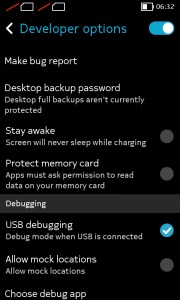
nokia_x_debugging.jpg
-Users will be required to enable USB debugging on the Nokia X that can be found in Settings' Developer option. You will have to tick the USB debugging box to successfully perform the rooting process.
To start, you will have to enable USB debugging. To do this, first go to your phone's Settings > Developer and tick the USB debugging box.
-Next users have to download the Farmaroot.apk to the Nokia X or to a Windows PC (transfer it to the Nokia X). Use the automatic setup to install the root tool on the Nokia X phone.
To start, go to the Farmaroot.apk folder in your Nokia X > Click the .APK file and it will start the automatic installation of the app on to the phone, follow the instructions.
(If a file is transferred from PC to the Nokia X, users can search for the required file on the phone via the ASTRO File Manager, which comes pre-installed on the device.)
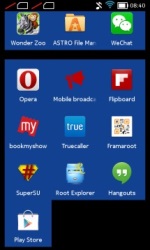
nokia_x_framaroot_app_success.jpg
Once, the Farmaroot has installed on your Nokia X, choose the app icon in app drawer to install SuperSU. To install, open the SuperSU file and choose the Gandalf exploit, which is a dropdown option in the Farmaroot app.
When the installation is complete, there will be a success pop-up message on the screen. Now you just need to reboot your Nokia X for successful completion of the rooting process.
- The Farmaroot app on the Nokia X also gives an option to unroot the device, if you want to bring it back to normal.
Installing the Google Play store on the Nokia X:
-Download the Google services APKs from here on your Nokia X or a Windows PC and copy the APKs to the phone using a USB cable.
To start, go to this link install the Google services APKs to your phone or Windows PC. Transfer all the Google APKs to Nokia X using a USB cable.
-Now, you will be required to extract all the Google APKs. To do this, first download a root explorer app on your Nokia X, which is a file manager for root users. 
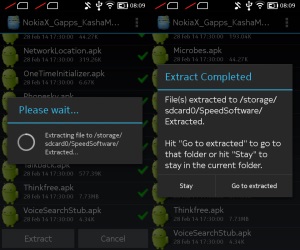
nokia_x_google_apk_extract.jpg
Go to the folder where you saved the Google APKs and select all the files; next from the menu choose the option Extract all. The extracted APK files will be automatically stored on to microSD card's SpeedSoftware folder. At this stage, do not install the APKs.
-The extracted files then must be moved on to /system/apps folder of the Nokia X. (Use the root explorer app, and go to the SpeedSoftware folder on the microSD card. Select the files, and from the menu, choose Cut. Then, go to the /system/apps/ folder, and choose Paste from the menu.)
-Next, you will have to change the permission of all the extracted files in the /system/apps folder by selecting all the files that were extracted (Google APKs) and opening the Permission option in the menu for the all the apps. The Owner, Group and Other options should have Read Only checked in the popup that comes when you press Permission. Only Owner should have the Write option checked. Reboot your Nokia X once the permission has been changed for all the extracted Google APK files to make the device more stable.
nokia_x_play_store_app_menu.jpg
-Now you will find the Google app icons for Hangouts, Gmail, and Google Play Store among others in the app drawer. 
Enjoy, you have successfully installed the Google Play store and other Google services on your Nokia X. Now sign-in to your Google account to access Google services on your Nokia X and you can explore your favourite Android apps directly from the Play Store.
This method works with the earlier version of the Nokia X software, but once you move to version 11.1.1, new security features don't permit this technique. There's a new method that can help if you've updated your phone though.
Method 2-
In case the above method does not work because of new security restrictions, here's what you can do:
-Install the Nokia composite ADB interface on your Windows PC, in addition to installing the Framaroot.apk on your Nokia X (following the steps detailed above). 
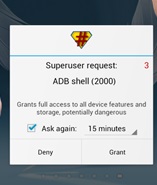
superuser_request_nokia_x.jpg
The Nokia composite ADB interface folder installed on your PC should have two sub folders for KingoRoot_NokiaX_Mod and Nokia X USB drivers.
-Plug your Nokia X to the Windows PC with a USB cable, open the device manager and right click on the connected device. This gives the Update Driver option on your Windows PC, to install the ADB drivers.
You might be prompted to enter new drivers for your Nokia X, which can be found the Nokia composite ADB interface folder - Nokia X USB drivers. Just choose browse, go to the folder and select the driver.
-Now you need to open the KingoRoot.exe file on your Windows PC, which can be found in the Nokia composite ADB interface folder. Please note that you need to keep your Nokia X connected to the Windows PC during the complete process.
kingoroot_app_screenshot.jpg
-Once you have started the KingoRoot app on the PC, it will appear on your Windows PC screen giving you an option to root the connected device. When the phone is not rooted, KingoRoot on the PC shows the status of the connected device as Not Rooted.
-Now users need to choose the Root button in the KingoRoot app on your PC to root the device. This will also install the SuperSU app on the connected Nokia X device automatically. This will take few minutes.
-Reboot the phone after the connected device (Nokia X) status in KingoRoot app shows Rooted on your PC. After the reboot, open the SuperSU app on the Nokia X, this will for the ask grant option on the app. Press grant and move ahead.
-After pressing grant, open KingoRoot on your PC again. This time the KingoRoot shows two options - Root again or Remove Root. To return your phone to normal, you can click on Remove Root.
-Now you can repeat the method of installing the Google Play store on the Nokia X (check Method 1) by extracting all the Google APKs using the root explorer.
nokia_x_google_search.jpg
*Note- Our recommendation would be to install Google Play Store and other services on your Nokia X when it is running version 10.0.3, rather than updating the phone to software version 11.1.1. This is because the new method requires the KingoRoot app on your PC and the steps are a bit complicated when compared to the Framaroot app that worked well enough for us on our Nokia X.

We were afraid that Nokia's glory days were well and truly over, when it announced the sale of its entire handset business to Microsoft. The Finnish giant defined generations of mobile devices, especially in India. As we moved from basic bricks that made only voice calls to smartphones with cameras and Internet connections, chances are we all owned a number of Nokias along the way.
As it turns out, we might not have to wait much longer to own a Nokia product again. Even though it struggled for years and then made a string of poor decisions leading to the sellout to Microsoft, Nokia has now demonstrated that it has no intention of getting out of the consumer product space and letting its brand die. Licensing terms might not allow it to sell smartphones for some time, and so we have the remarkable new N1 tablet leading the charge.
Nokia is showing off the N1 at its booth at the Mobile World Congress, currently under way in Barcelona. The N1 is already shipping in China, but Nokia won't say anything about when it might launch anywhere else other than the fact that it is committed to launching it in Europe next. It costs the equivalent of $249 (roughly Rs. 15,500) and, says the company, it is highly in demand.
nokia_n1_ndtv_12.jpg
It feels as though a part of Nokia has always wanted to release this tablet. Judging by its fit and finish, it seems to have been in development for a long time. Foxconn is the manufacturing partner and it should be no surprise that there is an Apple-level air of quality to it. The whole thing is made from a single block of aluminium and there are no seams or joints.
In terms of looks, the Nokia N1 is most like a first-generation iPhone, with rounded edges and corners but flat on both sides. It's available in two colours, Lava Grey and Natural Aluminium. The finish is anodized so it offers a grip but still feels smooth. There are no slots or panels for SIM and microSD cards - the N1 is Wi-Fi only and its storage cannot be expanded. At 6.9mm thickness and a weight of 318 grams, this is a very portable, yet physically strong tablet.
nokia_n1_ndtv_15.jpg
The buttons on the sides, camera in one corner of the rear and even the positioning of ports and speakers feel strongly inspired by Apple, yet also complement the designs of phones such as the Nokia N9. In fact there are a lot of Apple-inspired touches even beyond the design. Nokia is clearly positioning the N1 as an inexpensive alternative to the iPad mini 2.
Fascinatingly, Nokia uses the USB Type-C connector for charging and data. This is the first example we've seen of a shipping product with the new, reversible standard. Nokia has styled the port on the bottom of the N1 to look just like one of Apple's Lightning ports. Interestingly, only USB 2.0 speeds are supported, whereas most Type-C implementations will support USB 3.1 speeds when the standard becomes widespread.
The tablet is powered by a 2.3GHz Intel Atom Z3580 processor and has 2GB of RAM. Only a 32GB storage configuration is available, and so we hope that larger capacities are planned for when the N1 launches in other parts of the world.
nokia_n1_ndtv_14.jpg
The screen has exactly the same size and resolution as the iPad mini 2: 7.9 inches diagonally and 1536x2048 pixels. The panel is laminated onto Gorilla Glass 3, which means there is no air gap and everything looks rich and crisp.
Wi-Fi b/g/n/ac and Blutooth 4.0 are supported. There's a 5300mAh battery for power. The rear camera has a resolution of 8 megapixels and supports 1080p video recording, while the front camera is 5 megapixels. There is no flash.
The other big story is the Nokia Z Launcher, which runs on top of Android 5.0. This is the company's main attempt at differentiation. First of all, it looks fantastic. Text is crisp, colours are muted yet elegant, and everything is smooth and responsive.
nokia_n1_ndtv_6.jpg
By default you see a grid of 12 icons, but can swipe left to pull up an alphabetised grid of all app icons. The homepage grid refreshes itself periodically and learns your habits, so for example the options displayed around the time of your morning commute will not be the same as the ones shown later in the day.
You can also simply scribble letters on any part of the screen to start searching for apps - this is incredibly fluid and is much quicker than tapping in a search field and then tapping letters. In fact it's like having a keyboard permanently available for quick shortcuts.
nokia_n1_ndtv_7.jpg
Anyone who doesn't like Z Launcher can switch to stock Android, and anyone who absolutely loves it can also download it for their Android phone. Nokia hopes people will come to see the N1's hardware and software as unified.
We think the N1, despite its unoriginal design touches, is a fantastic tablet. We look forward to testing its screen, performance, cameras, and more in more suitable conditions when it is launched in India. We don't know any dates but it is coming at some point - Nokia reps made a point of telling us that they are aware of the brand's power in India and have no intention of letting it slide into obscurity.
nokia_1100_android_lollipop_screen.jpg
One of Nokia's most popular feature phones, the Nokia 1100, is once again in the news. A handset with that model number was spotted running Google's latest Android build and powered by a quad-core processor under the hood.
Nokia's legendary phone has been spotted at a benchmark listing tipping details of the innards. First spotted by Nokia Power User, the Nokia 1100's Geekbench browser benchmark results show the handset running Android 5.0 Lollipop while including a quad-core MediaTek (MT6582) processor. The listed Nokia 1100 handset is seen featuring 512MB of RAM. Apart from the Android version, processor, and memory, there are no details about other specifications.
With the form factor of the original Nokia 1100, we find it hard to believe the Finnish company might be testing running any version of Android on it, forget Lollipop. It is more likely an in-development smartphone that the company is using the same model number for. Of course, the spotted Nokia 1100 with Android is unlikely to debut before Q4 2016, as the terms of Microsoft's acquisition of Nokia's Devices and Services business stipulate Nokia can no longer use its brand on smartphones till Q4 2016, and on feature phones for 10 years.
The Nokia 1100 was launched late in 2003 and is one of the company's biggest milestones as it's owned by around 250 million people worldwide, according to the company. Nokia even claimed that the Nokia 1100 was "the world's most popular phone."
Last year, Nokia neatly bypassed the restrictions imposed by the Microsoft deal and launched the Nokia N1 tablet. The company called it the "first Nokia-branded Android tablet" and was initially launched in China in Q1 2015 with a brand-licensing agreement extending to an OEM partner (Foxconn) that would manufacture, distribute, and sell it.
A special version of the Lumia 930 has been launched by the company as the company has introduced 24k gold plated Lumia 930 smart-phone without any internals changes. Go through this blog for more information on this device like price, specs and features.

Gold Plated Nokia Lumia 930
For lots of people, a couple of golden-colored Lumias were not enough, so the Vietnamese luxury brand Karalux may have what you are looking for. As the company has launched 24k gold-plated limited edition Nokia Lumia 930 that been launched in the market. However, the company only developed 99 numbered units.
This new Windows Phone has been coated in 24k gold, giving a luxurious and advanced look for all those people, who enjoy showing off some wealth. Look quite similar to the gold-colored Lumia 930, the device’s metallic frame being of the real gold as the SIM card slot and buttons on the device are black for a wonderful contrast, but ultimately, it is giving a pretty decent look.
Moreover, there are only two messages on either side of the device, reading Limited Edition and 24K Gold Plated Nokia Lumia 930 as it make sure no one mistakes this for a mere gold coasting of paint.
Making this high-end smart-phone coating gold is not as easy as it sounds; it was tough job for the company. The company said that it was also difficult for engineers as well because they had to go through various stages to ensure that its perfect, but we can say that they have done a great job.
When it comes to talk about internals of the device, the company did not make any changes. It comes with all the features of a high-end device and it ships with Windows Phone 8.1 as its operating system.
Last, but not least point of this device is price, the all new 24k gold plated Lumia 930 costs 18,000,000 Vietnamese Dong which rounds up to almost $842, which is higher than the normal price of the handset. But the device is not as expensive as other gold-plated devices like Blackberry Passport, iPhone 6 and more.
So, if you love to show-off among your friends and in public, you can purchase this excellent device that can boost your status among them.